

Operation Diagnostic displays in Engineering UI
Processes
This display allows you to monitor running calculation processes and configure changes that are not possible in Calc Catalog. However, we recommend configuring calculation process changes mainly in Calc Catalog.
| Property | Data type | Description |
|---|---|---|
| Name | String | Name of the calculation with unique calculation process number. |
| PriorityClass | Enum | Allows to choose priority status for executing calculation. |
| NumThreads | UInt32 | Number of threads the process is allowed to use for calculations. |
| Disabled | Boolean | Prevents the process from running. |
| PID | Int32 | ID of the running process. Comes from server. |
| Restart | Boolean | Set to true if process wants to be restarted. This is used by Calc Engine when a process needs to be restarted for recompilation. |
| Run As 32 Bit | Boolean | Set to true, if process needs to be run as 32-bit. This is needed, if some dependencies are 32-bit dlls. |
| Monitor performance | Boolean | Enables diagnostics for calculations and processes. Can be found under CalcEngineDiagnostics. See further information. Allows monitoring process in trend. |
Services
This display allows you to monitor machines with running RTDB service. We do not recommend configuring any settings on this display, but use it for monitoring.
Services is a table for CalcService class and it is an RTDB service that is responsible for the top-level Calculation Tool functionality.
CalcService is responsible for starting and managing CalcProcesses, which do the actual execution of the calculations.
In addition, CalcService compiles the calculation code, which the CalcProcesses execute.
| Property | Data type | Description |
|---|---|---|
| Name | String | Name of the machine |
| PID | Int32 | Id number of the machine. Comes from server. |
| StartUpTime | DateTime | Timestamp for when the machine was last started. |
Tasks
This display allows you to monitor calculation tasks. We do not recommend configuring any settings on this display.
| Property | Data type | Description |
|---|---|---|
| Name | String | Name of calculation form. |
| Description | String | Optional description for the calculation task. Defines the calculation logic. |
| Process | Ref. CalcProcess | Process in which calculation task runs. Includes calculation name and unique process number of Equipment model calculations. |
| Constructor parameters | String | Optional constructor parameters for the definition code constructor, if the code takes them. |
| Error Message | String | Will contain any errors encountered during the execution of the task or fetching the mapped values. In case of a successful execution, it will be empty . |
| Batch Target | Ref. CalcMapping | The batch job variable mapping, meaning the name of equipment property or variable name used as batch indicator. Shows variable name or equipment model path and instance. |
| Batch Property | String | Specifies an equipment property, if batch job variable is equipment instance. |
| Calc Period | Int32 | Defines the calculation period for calculation task. Have to be larger than 0. If calculation period does not need to be set separately from scheduler trigger, this may be same as scheduler trigger. E.g. 1 min. |
| Calc Period Unit | Enum | Defines the time unit of calculation period. |
| Period Offset | Int32 | If set, delays the invocation of calculation code. |
| Period Offset Unit | Enum | Defines the time unit of offset. If not set, the total offset will be takes as the calculation period multiplied by value of PeriodOffset. For example, if the period of the calculation is 10 seconds, the period offset of -2 (PeriodOffset is -2 and PeriodOffsetUnit is None) will result in -20 seconds offset. |
| Base Time | DateTime | Sets the alignment of calculation periods. |
| Enabled Timeframe Start | DateTime | The calculation task is only enabled for calculation periods after this time (inclusive). |
| Enabled Timeframe End | DateTime | The calculation task is only enabled for calculation periods before this time (exclusive). |
| Skip Missed | Boolean | Whether intervals missed for any reason should be skipped or calculated. If enabled, don't calculate missed values. |
| Diag Update Interval Seconds | Int32 | Represents how often the CalcDiagnostics row for this task should be updated. Setting this to a low value for many CalcTasks can have negative effects on system performance. |
| Disabled | Boolean | When set to true, calculation task is disabled. |
| Continue on Error | Boolean | If true, task will run for the next execution context, even if there is an error on previous execution. |
| Max Run Seconds Before Killed | Int32 | The maximum time in seconds this task is allowed to execute for. 0 is unlimited. 120 seconds is the default value. |
| Group | String | The name of the group to which this calculation definition belongs to. For non admin user, they need to be part of the member group they are putting into this property. |
Mappings
This display allows you to create new and monitor existing calculation mappings. However, we do recommend configuring mappings in Calc Catalog display.
Each property is a row on the table meaning that each mapping is separated as its own row.
Data mapping settings for calculation
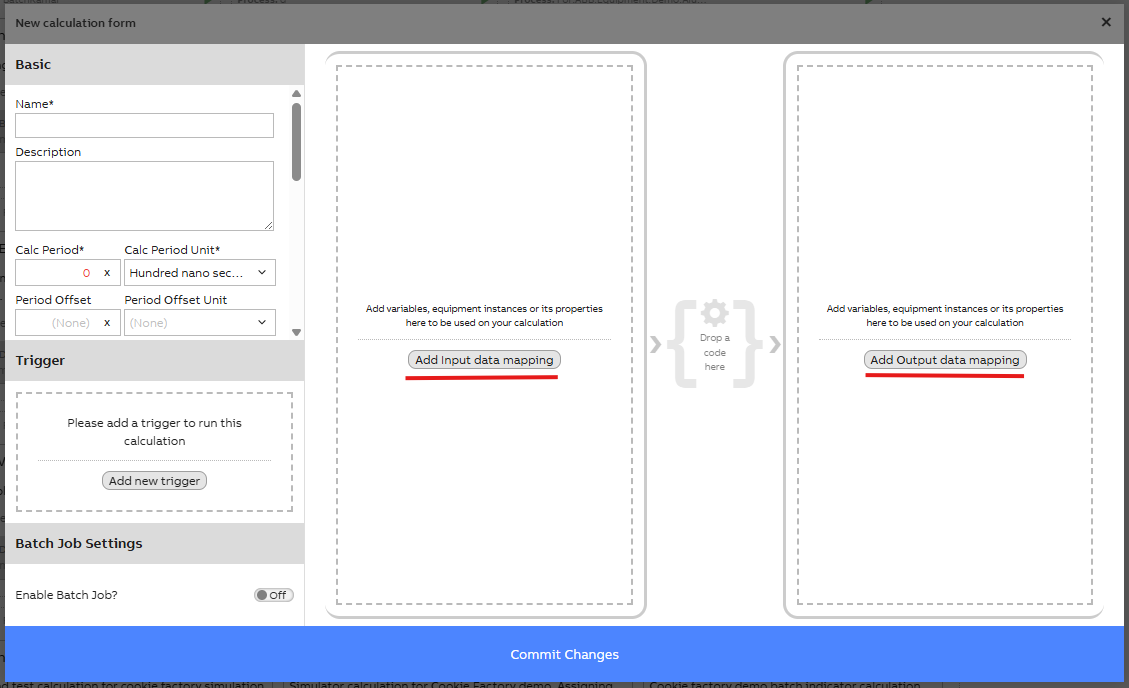
Data mapping settings for new calculation. Possibility to add input and/or output data.
Mapping properties on table
| Property | Data type | Description |
|---|---|---|
| Description | String | Optional description for the mapping. If mapping was done in CalcCatalog, on default, this column includes the calculation name and property/variable added as parameter. If new mapping is created on this table, you may write the description as seems fitting. |
| Class Name | String | Name of the variable or equipment class from which the instances should be fetched. For equipment models it is Path_EquipmentModelName. |
| Where String | String | Optional string to limit which instances are fetched. E.g. "Name=MyVariable". Further information and examples here . Example shown in image below. |
| Constant Value | Object | Optional. Can be a set value when class name is not set. |
| Datasource | Ref. CalcDataSource | Select the datasource to which the instances belong, the datasource values can be defined in the datasources table. |
Example of output data mapping settings for calculation
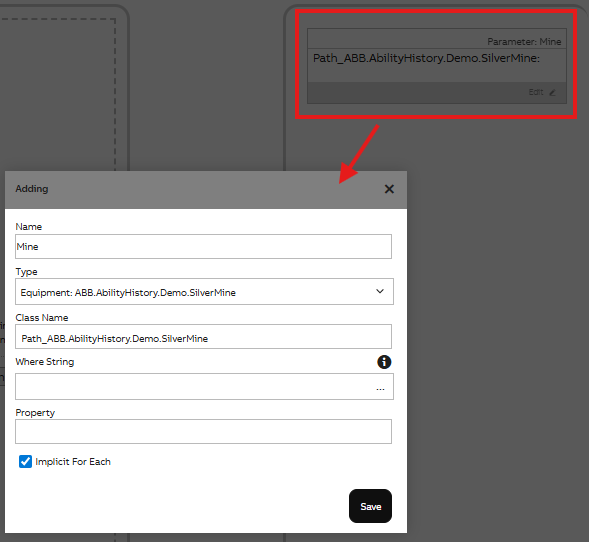
Example of data mapping settings for calculation
Parameter Mappings
This display allows you to monitor parameter mappings of the calculation task.
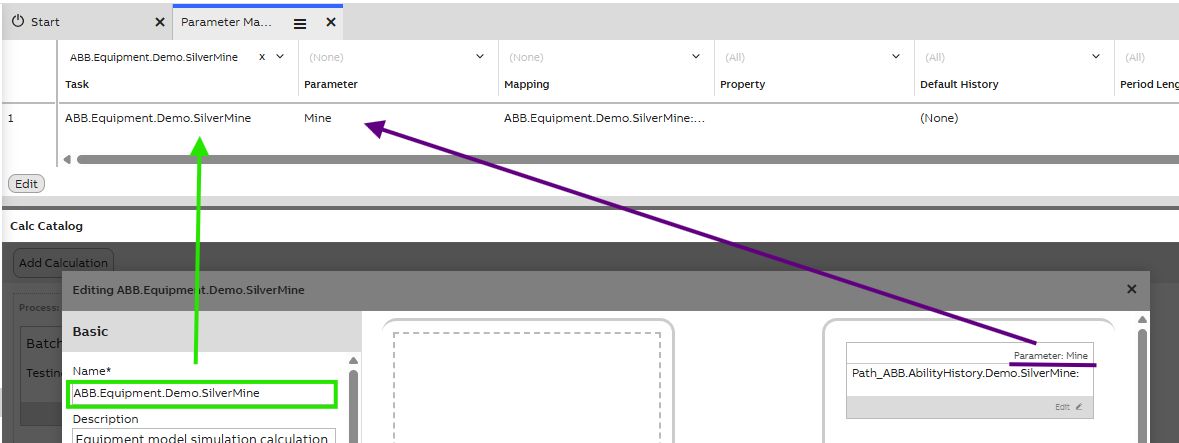
| Property name | Data type | Description |
|---|---|---|
| Task | Ref. CalcTask | Name of the task in which parameter mapping is done. As shown in green in the image above. This is a dropdown menu with all tasks. |
| Parameter | Ref. CalcParameter | Parameter(s) in chosen task. Shows both input and output mappings. Each mapping is on their own row, so if a task has multiple parameter mappings, these will all be separated to own rows in this table. |
| Mapping | Ref. CalcMapping | Information on this column comes from Mappings table description property. |
| Property | String | Represents the name of the property, if only interested in a property of the mapped class instance and not the instance itself. E.g., If mapping an Equipment of type 'Pump' and wanting to get the 'Temperature' property, * SelectProperty would be 'Temperature'. |
| Default History | String | Optional name of the history table to get values from, if not using the default (Defined in the 'TargetHistory' property of the variable or equipment property). |
| Period Length Override | Int32 | If value is defined, this will override the period length of the parameter which is defined in. |
| Period Length Unit Override | Enum | If the value is defined, this will override the period length unit of the parameter which is defined in. |
| Implicit For Each | Boolean | When having a CalcDefinition that operates on a non-array parameters and wanting to perform that calculation for multiple parameter sets, set this to true. If you have multiple 'ImplicitForEach' mappings for a single task, make sure the WhereString provides arrays in the same order by appending an 'ORDER BY' clause. |
Task Triggers
This display allows you to monitor calculation task triggers. Disabling a trigger on this display, disables it in every calculation it is used. This in mind, possible changes should be done carefully.

Calculation task trigger settings can be configured in single calculation settings in Calc Catalog
| Property | Data type | Description |
|---|---|---|
| Task | Ref. CalcTask | Name of the calculation task. |
| Type | Enum | Name of the trigger used in calculation task as above image shows. See Trigger Settings for more information. |
| Mapping | Ref. CalcMapping | When calculation task is triggered by event, this column shows path/EquipmentModelName/Id. |
| Triggered By Task | Ref. CalcTask | When calculation task is triggered by other task, the triggering task name shows in this column. |
| Scheduler | Ref. CalcScheduler | Shows the scheduler name that is used in calculation task. If scheduler trigger is not used, column shows (None). |
| Event Properties | String | When event trigger is used in calculation task, this column shows the name of the triggering property/variable. |
| Disabled | Boolean | Disables the trigger shown in the TriggeredByTask / Scheduler / EventProperties column. E.g., if user disables 1min scheduler shown in "Scheduler" column, this setting disables the trigger in Calc Catalog. With this setting, all calculations using 1 min scheduler trigger will be disabled, meaning calculations will stop running. |
| Class Level Listener | Boolean | Shows event happening in Class property of any instance. Set to true, if you want to listen inserts in the table/class of your Mapping. |
| Polling Interval Secs | Double | Checks changes within defined period. Set the interval (seconds) to poll for new inserts in the specific table/class. The default and smallest permitted value is 5.0. If ClassLevelListener is set to true, but database-level events are not listened for the specific table/class, then polling is automatically used. For example, this is the case for the OpcEvent table. |
| Warnings | String | Warnings on calculations (not process). |
Periodical Schedulers
This display allows you to set up and define periodical schedulers. Howeverer, we recommend configuring these in the calculation settings as image below shows.
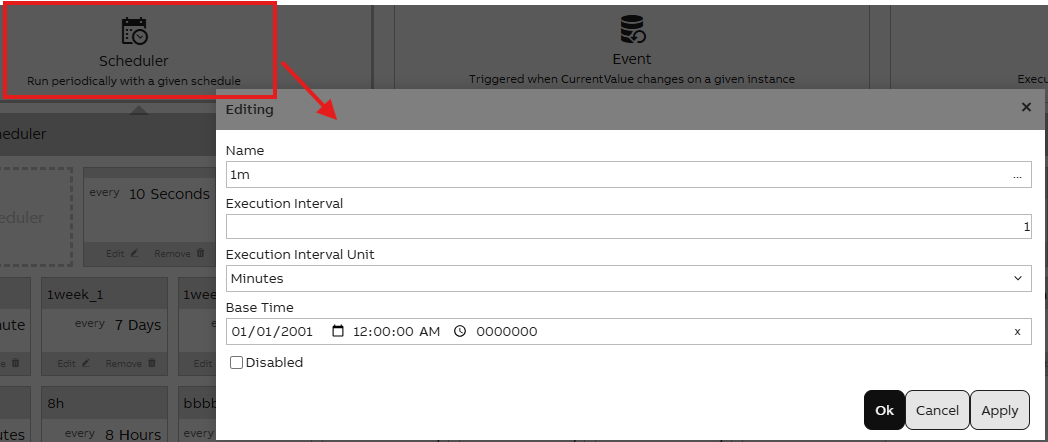
Periodical scheduler setting window in Calc Catalog display
| Property | Data type | Description |
|---|---|---|
| Name | String | Name of the periodical scheduler. |
| Execution Interval | Int32 | Provide interval of time for execution of the card. Must be positive number. |
| Execution Interval Unit | Enum | Interval unit on which to execute, e.g. second, minute, day. |
| Base Time | DateTime | How to align the execution times. For example, to run hourly at five seconds past, BaseTime should be 2000-01-01 00:00:05 and ExecutionInterval 1 hour. |
| Disabled | Boolean | This setting suspends the scheduler, not triggering any CalcTasks. |
Diagnostics
This display allows you to monitor calculation diagnostics. We do not recommend configuring any settings on this display.
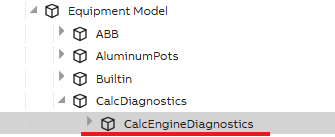
Example of where CalcEngineDiagnostics may be found in Tree
| Property | Data Type | Description |
|---|---|---|
| Task | Ref. CalcTask | Name of calculation task. |
| Last Execution Time | DateTime | Last time the task was executed. |
| Avg Execution Ms | Double | Average time in milliseconds executing a calculation task takes. |
| Last Calculated Period End | DateTime | End time of last calculation period. Calculation period may be defined in calculation settings. If no other period time needs to be defined, the calc period may be set same as the periodical scheduler. |
| Num Executions Since Update | Int32 | The number of times the task was executed since the last update to the diagnostics table. |
Whitelist(read-only)
This display allows you to see the list of Whitelisted items for the calculations. Only admins with direct connections to the database can add, modify or delete items on this list. Changes may be done in Vtrin. Please see further details and instructions in API Whitelisting.
Settings on this list are applicable for all calculations in Calc Catalog and therefore it is on users risk.
| Property | Data Type | Description |
|---|---|---|
| Definition | Ref. CalcDefinition | You may define single calculation or allow whitelisting for all. Default value is (None) meaning Whitelist value is used for all calculations. This may be defined for specific calculation by writing calculation name here. |
| Whitelist Type | Enum | WholeClass: Members of a class are accessed by using WholeClass. These need to be whitelisted as [namespace].[ClassName]. Wildcard: Whitelist value is a Wildcard format like: System.Text.* |
| Whitelist | String | The definition of the whitelisting we want to add. Format should be as shown above. |
| UserGroup | String | Definition of specific user group, if whitelisting is not meant for Everyone. Can be e.g. \RTDB-CalcUser. |
| Comment | String | Allows admin to add a comment specific for the whitelisting. |
Updated 1 day ago