

OData Problem solving examples
Power Query issues (Excel and Power BI) with array parameters
Power query, that is used by Excel and Power Bi, do have some issues when it comes to array parameters in functions. This is what we use when fetching historical data, so we have come up with a workaround.
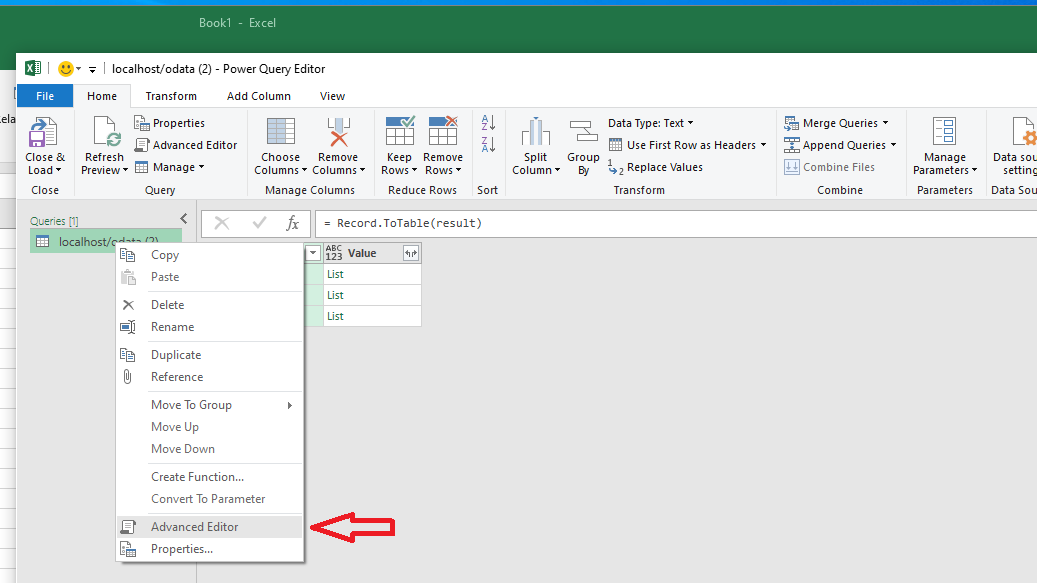
- Open Power Query Editor and create a new blank query.
- Now on the left you can see Queries list.
- Right click on top of the queries list and from opening menu choose advance editor.
- Paste the workaround code that is shown below after the image. Define the parameters as you need and then select Done.
Workaround code
let
    classname = "EquipmentHistory",
    wherestring = "Path=%3F AND Property=%3F",
    whereargs = "['ABB.System Monitoring.ROOPE', 'DISK_Load']",
    startx = "2019-05-09T12:20:00Z",
    endx = "2019-05-09T13:30:00Z",
    /* Edit the values above and press Done */

    fetchResult = OData.Feed("localhost/odata/FetchGraphData(classname='" & classname & "', wherestring='" & wherestring & "', whereargs=" & whereargs  & ", startx='" & startx & "', endx='" & endx & "')", null),
    result = fetchResult{0}
in
    result
The result is three rows and each has a list. This can be turned into a nice table with few simple steps:
- First, convert the result into a table.
- Transform each list into a string value with each value separated by semicolon ( ; ).
- Split the string value from step 2 on semicolon ( ; ) and put each result in a new column. After this step you have a table with three rows and a lot of column.
- Flip columns and rows by pressing transpose.
Below is an example script when this is done.
let
    /* … above script is here */

    /* Below rows are used to turn the data into a table */
    #"Converted to Table" = Record.ToTable(result),
    #"Extracted Values" = Table.TransformColumns(#"Converted to Table", {"Value", each Text.Combine(List.Transform(_, Text.From), ";"), type text}),
    #"Split Column by Delimiter" = Table.SplitColumn(#"Extracted Values", "Value", Splitter.SplitTextByDelimiter(";", QuoteStyle.Csv), {"Value.1", "Value.2", "Value.3", "Value.4", "Value.5", "Value.6", "Value.7", "Value.8", "Value.9", "Value.10", "Value.11", "Value.12", "Value.13", "Value.14", "Value.15", "Value.16", "Value.17", "Value.18", "Value.19", "Value.20", "Value.21", "Value.22", "Value.23", "Value.24", "Value.25", "Value.26", "Value.27", "Value.28", "Value.29", "Value.30", "Value.31", "Value.32", "Value.33", "Value.34", "Value.35", "Value.36", "Value.37", "Value.38", "Value.39"}),
    #"Transposed Table" = Table.Transpose(#"Split Column by Delimiter")
in
    #"Transposed Table"
Issue with Power BI OData feed
In some cases, invoking OData requests with Power BI to publish reports to the Power BI cloud will not work. This can be solved by using Web.Contents() instead of ODATA.Feed() function, like so:
// result = OData.Feed(fullURL, null, [Implementation="2.0"]),
source = Web.Contents(address, [ RelativePath = path ]),
json = Json.Document(source),
Change Log
Performance Improvement: Utilize Filter-query in Backend
(Starting RTDB 5.3_23.04 version, 5th of April 2023)
Previously, when issued a GET-request with filter-query, all instances were fetched from backend and filtering done afterwards. Now, filter-query will be translated to a Vtrin mask and passed on to backend. With this, users are less likely to get exceptions, if fetching too many instances.
Below we give some examples which filter-queries can be translated to Vtrin mask:
- People?$filter=Name eq 'Milk'
- People?$filter=LifeTime gt 1 and LifeTime lt 20
- People?$filter=not (Age eq 50)
- People?$filter=100 le LifeTime
- People?$filter=FirstName eq 'Mike' or ID le 500
- People?$filter=startswith(Name, 'Mi')
- People?$filter=endswith(Name, 'ke')
- People?$filter=contains(Name, 'ik')
If filter-query contains expression which are not translatable to Vtrin mask, it will be removed from preprocessing (pre-filtering), but will be postprocessed if possible. For example:
- People?$filter=length(Name) eq 1
- People?$filter=trim(Name) eq 'Mike'
- People?$filter=ceiling(ID) eq 1
- People?$filter=startswith('Mi', Name)
- People?$filter=ID add 1 eq 10
- People?$filter=indexof(Name,'Mike') eq 1
Updated about 2 months ago