

Tags and variables
Concept
A Tag Class (Tag) is a virtual Vtrin class used to configure the database to collect and store process data. This article introduces tags and their related functionality and shows how different tools can be used to create tags and to start collecting process history.
Tags are used to define how the data should look in the database. It defines a name and a unique ID for data structures and a data type of stored data.
Tags also define the data source. In the most common cases, it allows configuring OPC DA settings for each tag separately, such as OPC server, item IDs and update rates. In addition, it defines which data collector in the hierarchical node layout is used to collect data.
In addition, Tags also specify how data is further processed: Compressed and preprocessed before storing it in the database, and what kind of upper-level histories (secondary logs) are collected from raw history (current history). An example of upper-level histories would be averages calculated over one minute, hour, or day.
Behaviour
Important aspects from Tag:
- The only unique identifier of the Tag is the ID property (the type of ID is GUID). This makes it possible to create tags in distributed environments without name clashes.
- The creator of a Tag can propose a name for the Tag. If the proposal name is unique within the local node, it is accepted as-is. Otherwise, there is a renaming algorithm to ensure name uniqueness. The name of the Tag can be changed later on by setting a new "ProposedName". The "DisplayName" property shows the actual name after the uniqueness algorithm has been applied.
- Once a tag is deleted, the references to already stored data will be lost. Although historical data is not deleted, it is impossible to refer to and access it. Despite a new tag being created with the same property values, it is a new tag. The old history data will not be found.
- In a hierarchical node layout, it is up to "RTDB-TagConsistencyController" to propagate tag definitions between the main node and DCNs. It has to be created manually in only one node.
- Implementing class instances should never be deleted manually behind the Tag, as this breaks the Tag instance (e.g., an associated variable should not be deleted alone). Deleting a tag instance using Vtrin is acceptable, however, as it is able to clean the associated instances and references.
- All tag instances are independent of each other.
Relations between classes
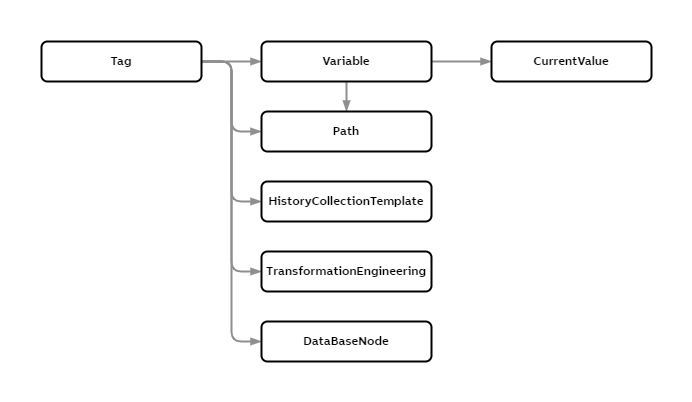
| Concept | Description |
|---|---|
| Tag | Tag is an interface class for configuring data collection and historization. When database is configured creating a tag is the only thing needed. Instances that implement the functionality (classes, Variable, CurrentValue, Path...) are created or used automatically. |
| Variable | Defines what is the type of data and how it can be characterized. As well it defines how incoming data is processed, e.g., compression settings and preprocessing. |
| CurrentValue | Stores the most recent incoming data values. A starting point for the historization process. |
| Path | Provides hierarchical structure for tag and variable instances (browsing). |
| HistoryCollectionTemplate | Resolves for internal data structures. |
| TransformationEngineering | Defines the chain how historical data is further processed to upper level histories (secondary logs like AVG1minute). |
| DataBaseNode | Links tag to hierarchical node layout. Defines what data collector node is used to collect and buffer the incoming data. |
The Tag class is used to populate data collection in single node systems, but there is built-in support to easily configure all nodes in a hierarchical system layout as well. Figure below illustrates how "RTDB-TagConsistencyController" handles the configuration in a hierarchical node layout.
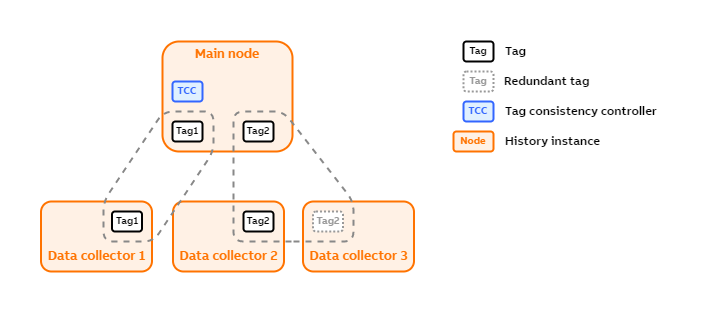
Each tag can be either redundant or non-redundant. A single data collector can contain both redundant and non-redundant tags.
Tag definitions
The complete definitions of all the properties in the Tag class may be found in the tables below.
| Property | Description |
|---|---|
| Proposed Name | This is a mandatory field to create an entry in to the list |
| DA Type | This specifies Protocol and Client which will be used to collect data. Available Types: OPC DA OPC UA (RTDB-EcopcClient) OPC UA Linux (RTDB-OPCUA Client) MODBUS Vtrin |
| DA Path | Based on the DA types Both the ProgId and CLSID of the OPC server should be given to prevent the usage of remote OPC registry browsing or usage of OPC enum component. If the OPC server is locally connected, <host> and <clsid> can be dropped, e.g. OPCUA: MODBUS: |
| DA Frequency | Data collection frequency in millisecond (default is 1000ms) |
| Activity | Active (Default is Inactive) |
| DataFlowDirection | Option [in] means RTDB-OPCClient reads data from OPC Server, then write them to RTDB; Option [out] means RTDB-OPCClient reads data from RTDB, then write them to OPC Server. (default is '[In]') |
Tags for Redundant data collection
For the Tags where redundant data collection is supported the properties to consider are listed on the table below.
| Property | Description |
|---|---|
| ConsistencyControlled | The Tag is under tag consistency control only if this has been set to true. The default is false. |
| CollectorNode | Defines the collector node for this tag. Refers to the DataBaseNode instance that defines all nodes available in the system. |
| RedundantDataCollection | Defines whether the redundant data collection is done for this Tag. Default is false. |
| CollectorNodeRedundant | If the RedundantDataCollection is defined to be true, this should be set to refer to the node that does this redundant data collection. |
| DaTypeRedundant | In the redundant collector node, this DaType setting is used. Available Types: OPC DA OPC UA (RTDB-EcopcClient) OPC UA Linux (RTDB-OPCUA Client) MODBUS Vtrin |
| DaPathRedundant | Based on the DA types Both the ProgId and CLSID of the OPC server should be given to prevent the usage of remote OPC registry browsing or usage of OPC enum component. If the OPC server is locally connected, <host> and <clsid> can be dropped, e.g. OPCUA: MODBUS: |
Creating a tag creates a variable
Creating a Tag creates a Variable as well. The Tag class extends the Variable class with some additional functionality. In addition to just extending the functionality of Variable, the Tag class also hides some details from the Variable class. In cases where some functionality is only available in the Variable class, the user might want to fine-tune the behavior by accessing the Variable properties directly.
In addition, sometimes, the user wants to create variable instances without creating a tag instance. A typical example of this would be variables used in C# calculations. In case the calculation is producing data to a variable, it might make sense to only create a variable without a tag, in order to get as lightweight a solution as possible.
Next we will discuss variable definitions and how these can be configured in Engineering UI.
Variable
A variable is a named location where you can store a single value in the RTDB database. When creating a new variable, a user defines the variable value type, its maximum and minimum value etc and can connect the newly created variable to a data source.
In ABB Ability™ History, every variable has a CurrentValue property (among many other properties). The value of that CurrentValue property is updated at intervals and can be plotted into a trend chart. Often, the source of the value is devices or sensors that produce data continuously and are connected to ABB Ability™ History RTDB database using the OPC DA protocol.
However, a variable has its limitations because it is a flat list of historized values and the preferred way to store historized value in industrial settings is in a hierarchical way.
Configuring variables in Engineering UI
Variables display can be found under Information Model folder. This display shows a list of created Variables. You may modify the already existing ones or create new variables from the Edit button at the bottom. Remember to commit changes to save them.
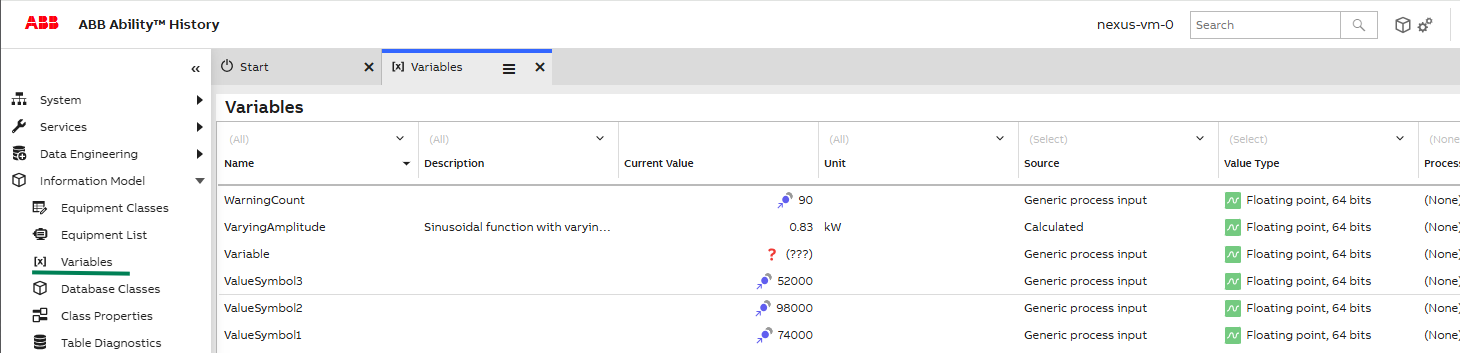
The table below gives further information on how to define a new variable.
| Attribute | Type | Description |
|---|---|---|
| Name | String | Name of the variable. Must be unique within all the variables. |
| Description | String | Free description of the variable. Max 128 characters. |
| Current Value | CurrentValueDisplay | Current value of the variable. |
| Unit | String | Value unit (e.g., kg, kWh) |
| Source | Enumeration | System from where the variable values originate. The source may be an external system or the system itself. |
| Value Type | Enumeration | Data type of the variable value. Please be advised that array variables can only be stored in StreamHistory table. |
| Process Path | Path | Process name indicating process hierarchy. |
| Target History | History | The history table that Current values for this variable will be recorded in. Zero (none) defaults to CurrentHistory. Further information here. |
Further reading
Tutorials
- Create Tags in Engineering UI - This tutorial gives a step-by-step guide on how Tag configurations can be done in Engineering UI.
- Create Tags using Excel Bulk Load Tool - This tutorial shows how excel bulk load tool may be used and discusses what are the requirements for it.
- Calculation code example using Tags - This example helps the user to fetch Max Value and Min Value of a Tag using the calculation.
Related Classes
- Aggregated Histories - This article describes what kind of mechanisms there are for configuring how numerical process data is stored into process history tables.
Other recommendations
- Hierarchical Systems using Tags - Tag Consistency Controller (TCC) is a component in ABB Ability™ History that controls the transferring of tags' definitions between nodes in a hierarchical system.
- Redundant data production article - ABB Ability™ History is frequently used in redundant configurations for achieving high availability. When looking for a high-availability solution against any single point of failure, data production is typically made redundant. The article discusses the various combinations of data production of a single and redundant History node.
Updated about 2 months ago