

VtrinLib
ABB Ability™ History's data abstraction interface is called VtrinLib. It provides an easy way for any kind of client software to connect to any supported data provider.
Introduction
VtrinLib is a client API that allows clients to access any data source for which a driver is available. The data abstraction layer allows clients to use the same interface, no matter what data source they are accessing. Key benefits are:
- Provide independent life cycles for the components by decoupling the clients from the data providers and hiding the details of the storage implementations.
- Connectivity to any data source with the same interface. The client can use any of the data sources and combine data from several of them with the same interface. Several data sources can be connected to one Data Abstraction Interface server.
- Provides an application architecture that is open and easy to integrate with other applications.
- Provide an extendable way to implement standard system interfaces, such as OPC UA, to handle application data without the need for changes in the middleware interfaces.
- Enforce controlled cybersecurity for the applications and systems with user authentication, secure transport, data access security, and audit logging.
- Take care of the common functions that provide additional value for most of the applications, such as online aggregation of the data in queries.
- Provide performance that is not limited to its use in the applications.
- Enable flexibility in the system topology and connectivity between networked systems.
- Provide the possibility to extend functionality with application-specific object models and business logic.
Drivers
Data Abstraction Layer (VtrinLib) provides object-based data access to any data source for which a driver is available.
VtrinLib reference
The currently available drivers are:
-
ABB Ability™ History (RTDB)
SQL (example drivers available for)
- ODBC driver
- OLEDB
- SQL Server
-
OPC DA/HDA data sources
-
Text file sample driver for education purposes
-
The custom Oracle driver is also in production use
History of VtrinLib
VtrinLib was originally designed for UI servicing. The roots of the technology go back to the RTDB_Explorer (1999) written in Visual Basic 6.0. A complete rewrite was performed in 2002 using the .NET Framework (Vtrin 1.0).
Since 2005, VtrinLib has also been used for serving a growing number of server-side software:
- cpmPlus History Calculations
- cpmPlus OPC DA/ HDA/ UA servers
- cpmPlus VtrinLink, TagConsistencyController, EventForwarder
VtrinLib has been continuously improved; the development has never stopped. The long experience with VtrinLib shows that the API is quite capable of serving a process history UI.
cpmPlus View Server Baseline
VtrinLib is used in the cpmPlus View as the server baseline (in the Mia Server service). There was no need to re-invent the wheel as we chose VtrinLib for the purpose, and we needed slight changes to the code to meet the cpmPlus View requirements. Plans exist to build a VtrinLib driver on top of the Mia Server, allowing VtrinLib to be used as a Mia Client.
Main features
| Feature | Remarks |
|---|---|
| Data abstraction | Same interface for all data sources |
| Data caching | On both the client and server |
| Object model | Class / Class Property / Class Instance |
| Query engine | SQL style WHERE clause parser Filters (runtime aggregation, averages, sums, deviations, maximums, minimums, etc.) for almost any data |
| Secure remote access over TCP or HTTP | Strong encryption Data compression Optional PGM / UDP event multicasting Chainable design (Gateway servers) Communication layer is backwards compatible with most older versions (newer client can communicate with older server) Forward compatibility often works too (but is not guaranteed) |
| Authentication | Based on OS native user account management |
| Access control | Access Control Lists Owner / Group / Other Flags |
| Events (for data change) | Always available if the update is done through VtrinLib Triggering by external updates needs support from the data source driver |
| Portability | Same DLL works on both Windows (.NET) and Linux (Mono) |
Data access
The following API presentation is the VtrinLib API used on Mia Server, not in the JavaScript Client API (used in the browser)!
Time Handling
All timestamps in the VtrinLib are handled in UTC (Universal Coordinated Time) except when they are presented to the end user or when calculating local time based time intervals. By default the UI should display time stamps in server’s local time.
The .NET framework DateTime API does not contain a history of time conversion rules (which makes it impossible to convert other than the current time between different time zones). VtrinLib provides a separate API for this that makes it possible (UTC2ServerLocal, ServerLocal2UTC in the driver object).
Object Model Basics
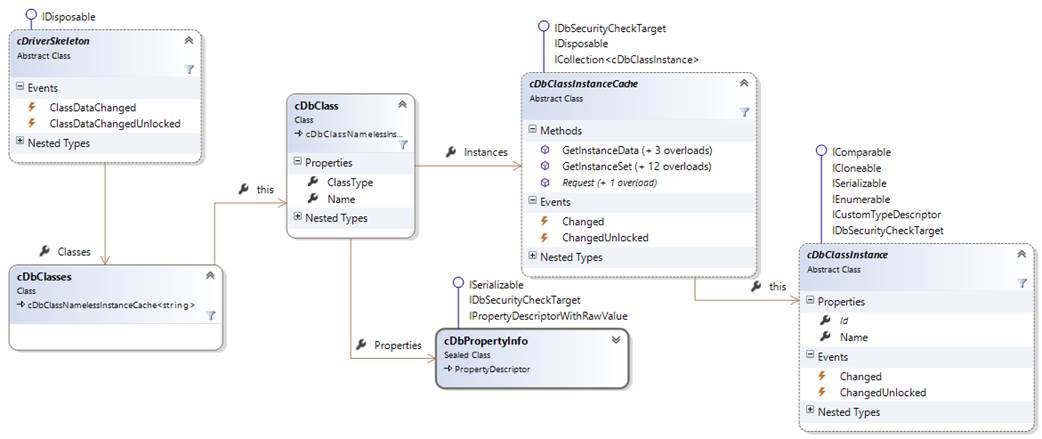
cDriverSkeletonis the base class for all data source drivers.- A data source driver has a collection of the classes (
driver.ClassesascDbClasses) in the data source. - Each class definition (
driver.Classes[“ClassName”]ascDbClass) contains a collection of properties (class.PropertiesascDbPropertyInfo[]) and a class instance cache (class.InstancesascDbClassInstanceCache). - The class instance cache provides an access to the class instances (
class.Instances[instanceid]ascDbClassInstance) which provide the actual data in the data source.
For example, a typical mapping between a data source providing access to a relational database goes as follows:
| Relational Database | Object Model |
|---|---|
| Table | Class |
| Column | Class Property |
| Row | Class Instance |
Special Properties
| Property Name | Remarks |
|---|---|
Id | Id is the unique primary key of the class instance. It can consist of a single value or can be a multipart key consisting of an array of values. Id is required to be able to update the class instance and to receive events. If the class does not have Name or DisplayName properties, Id will be shown to user. (As a general guideline: Please try to avoid displaying GUIDs or similar to end users.) |
Name | Name is an optional, (typically) unique property that provides convenient access to objects with name (e.g. Tags). If the class does not have DisplayName property, Name will be shown to user. If Name is not unique, Name (Id) will be shown to user. |
DisplayName | DisplayName is an optional property containing a non-unique (possibly language supported) name for the class instance. If DisplayName exists in the class, it is normally the one that will be shown to user. |
Parent | Parent is an optional property that contains the reference to a parent object. Parent is used for example in the security inheritance and in tree structuring. |
Owner, Group, OwnerPermissions, GroupPermissions, OtherPermissions and SecurityMask | Owner, Group, OwnerPermissions, GroupPermissions, OtherPermissions and SecurityMask are optional properties that are used in the access control. Defining access control is also possible without these properties using Access Control Lists (ACL) |
Value and Raw Value
There are two concepts of property values in VtrinLib: Value and Raw value. Value is usually something that you want to show to the user. These are, for example, timestamps in local time, resolved class references or language-supported text representations of enumeration values.
Raw values are the actual values in the data storage (usually as native .NET types), for example, timestamps in UTC, foreign keys (for class references), plain numbers (of enumeration values).
Fetching Data
Prerequisite for retrieving the data is a correct class definition (see Class Definitions).
NoteThe following examples are based on the equipment model defined in the Equipment model tutorial.
Fetching a single value
Using the ID or Name of the class instance to retrieve a property value from a class single instance:
value = Driver.Classes["ClassName"].Instances["Id/Name"]["PropertyIndex/PropertyName"];Null value checking should not be forgotten because class and property definitions are dynamic.
You can use cDbClassInstanceCache::Request to optimise queries between different parts of the code:
cDbClassInstanceCache.Request("Id/Name");This helps to optimise queries between different parts of the code. E.g. in a process display, the current value controls call Request in the initialisation and executes fetch only in the painting phase so that multiple queries are merged as a single query.
Fetching multiple instances
cDbClassInstanceCashe.GetInstanceSet()Parameters for GetInstanceSet can contain a list of instance IDs, names, a mask array or a combination of any of these.
For example:
var rtInstances = driver.Classes["DataAccessRealTime"].Instances.GetInstanceSet();
if (rtInstances.All(rt => !rt.GetRawPropertyValue("TargetReference").Equals(dataAccessOption.TargetReference)))
{ …
Translates to:
String sName = "Test";
String dataAccessOptionTargetReference = "TR"

cDbClassInstance[] instances = mDriver.Classes["DataAccessRealTime"].Instances.GetInstanceSet(
new cDbPropertyMask[] { new cDbPropertyMask("TargetReference", cDbPropertyMask.cMaskType.Equal, dataAccessOptionTargetReference) }
);
Or simply:
cDbClassInstance[] instances2 = mDriver.Classes["DataAccessRealTime"].Instances.GetInstanceSet(
"TargetReference=?",dataAccessOptionTargetReference
);
Some more examples for the same table:
String sName = "Test";
String dataAccessOptionTargetReference = "TR";

// sample 1:
// You can add new cDbPropertyMask objects to the array as required
cDbClassInstance[] instances = mDriver.Classes["DataAccessRealTime"].Instances.GetInstanceSet(
new cDbPropertyMask[] { new cDbPropertyMask("TargetReference", cDbPropertyMask.cMaskType.Equal, dataAccessOptionTargetReference) }
);

// sample 2:
// The simple with only a few simple options can be written as:
cDbClassInstance[] instances2 = mDriver.Classes["DataAccessRealTime"].Instances.GetInstanceSet(
"TargetReference=?", dataAccessOptionTargetReference
);

// sample 3:
// The simple with only a few simple options can be written as:
cDbClassInstance[] instances3 = mDriver.Classes["DataAccessRealTime"].Instances.GetInstanceSet(
"TargetReference=? AND Options LIKE ?", dataAccessOptionTargetReference, "*w"
);

// sample 4:
// The more complex query with two filter options revisited:
cDbClassInstance[] instances4 = mDriver.Classes["DataAccessRealTime"].Instances.GetInstanceSet(
new cDbPropertyMask[] {
   new cDbPropertyMask("TargetReference", cDbPropertyMask.cMaskType.Equal, dataAccessOptionTargetReference),
new cDbPropertyMask("Options", cDbPropertyMask.cMaskType.WildCardStringMatch, "*w")
}
);
Check the cDbPropertyMask.cMaskType for various filtering options
Some generic examples:
// get instances from Path having the define process area and process group (in this example devices are in [Site.ProcessArea.ProcessGroup] hierarchy)
cDbClassInstance[] instances = mDriver.Classes["Path"].Instances.GetInstanceSet(new cDbPropertyMask[] { new cDbPropertyMask("Name", cDbPropertyMask.cMaskType.WildCardStringMatch, "*." + sProcessArea + "." + sProcessGroup) });

// Check for existing enumerations from UIString:
cDbClass sscls = mDriver.Classes["UIString"];
         cDbClassInstance[] set = sscls.Instances.GetInstanceSet("Section=? AND Key=?", "Enums", sName);

// Get children of an instance in equipment instance hierarchy, where sPath is the path of the instance
cDbClass cls = mDriver.Classes["Path"];
cDbClassInstance[] instances = cls.Instances.GetInstanceSet(new cDbPropertyMask[] { new cDbPropertyMask("Parent", cDbPropertyMask.cMaskType.Equal, sPath) });
Grouping (Group By)
cDbClassInstanceCache.GetInstanceData()Updating Data
Creating and Updating Instances
Create a new instance:
cDbClassInstance instance = Driver.Classes["Path"].Instances.Add();Update and instance:
cDbClassInstance newInstance = instance.BeginUpdate();The return value of both of the above is a temporary cDbClassInstance object that should be used in the update. The original instance may be changed during editing.
The property values can be set for the instance in two ways:
instance["PropertyName/PropertyIndex"] = value
instance.SetRawPropertyValue("PropertyName/PropertyIndex", value) // using the raw value
After setting the values
instance.CommitChanges();must be called to commit the values. Multiple instances can be committed with:
cDbClassInstanceCache.CommitChanges(cDbClassInstance [])The commit calls will raise an exception if the committing fails.
After a successful commit, the changes are stored in the database, and the temporary class instance can be abandoned. Updating can be cancelled by just abandoning the temporary instance.
Note for Driver Developers
The CommitClassInstances method in the driver object should return either the committed instances with changes (if exist), instance Ids,nullor exceptions (inherited from System.Exception). The driver should check that the instance in the database corresponds to the instance that was edited in the client, and otherwise raise the ”Target Row Not Found” exception. This check can be overridden with force parameter:
Deleting Data
To remove one instance from the database:
cDbClassInstance.Remove()To remove multiple instances:
cDbClassInstanceCache.Remove(cDbClassInstance [])
cDbClassInstanceCahce.Remove(object [] ids)
Listening to Events
Data change events are always triggered if the update operation is done through VtrinLib. Events triggered by external changes have to be generated by the data source driver.
The event handler can be set to the following events:
| Event | When called |
|---|---|
cDbClassInstance.Changed | A change in the instance |
cDbClassInstanceCache.Changed | A change in any instance of the class |
cDriverSkeleton.ClassDataChanged | A change in any instance of any class |
The event handler will receive one or more of the following àrguments:
- The class affected by the event
- The event type (
Insert,Modify,Delete, orInvalidateCache) - The instance affected by the event
- A clone of the instance,
OldInstance(Only ifcDbClass.NonCacheable == false, otherwisenull)
Command Classes
Command classes are used to execute parameterised commands.
Examples in ABB Ability™ History: ClearScenario, CommitScenario, RestoreFromBackupandUpdateHistory.
The command is executed by creating an instance (.cDbClassInstanceCache.Add()), setting command parameters to the new instance as property values and calling CommitChanges()` (as described above).
The driver has to implement a commit routine that handles the command.
All parameters are of IN/OUT type, so it is also possible to get return values from the command.
Fetching XY-series
A separate API (FetchGraphData, cGraphFetchParameters, cGraphData, ...) for fetching XY-series exist in the data source driver. This can be used, for example, to show a series of historical values in a trend graph or in a list. Any values from any class can be used in the fetch: The property for X-axis and the property for Y-axis can be selected from any property of the class. In cGraphFetchParameters masking can be defined to limit the amount of data returned in the fetch (for example, to return values only from a certain period in time.)
Filters
Several pre-defined filters can be applied to the XY-series being fetched by defining the Filter parameter in cGraphFetchParameters. The Filter parameter is a string that consists of a single filter or a combination of filters.
If a suitable history of values already exists in the data source, an automatic optimisation API allows the data source driver to use the history for faster processing.
Some of the filters currently available:
AAVG, ADEV, ADEVP, AMEDIAN, AMODE, AUTOCORR, AVARIANCE, AVARIANCEP, AVG, AVGRAW, CALC(expr), COUNTx, CUMSUM, DELTA, DEV, DURx, FFT, FIRST, HISTOGRAM, INTx, LAST, MAX, MIN, OPTIME, PERx, RANGE, STABILITY, STARTUP, SUM, SUMRAW, VARIANCE, WHEN(xxx), WORST, …
If the type of the X-axis property is a timestamp, a time period can be added to the filter to define the span for the values calculated by the filter.
For example:
| Filter | Description |
|---|---|
| AVG | Calculate the average from all the values returned by the fetch |
| AVG5MIN | Calculate time-weighted averages for 5-minute time periods |
| SUM1MONTH | Calculate sums for 1-month time periods |
If the X-axis property contains data other than timestamps, a number added at the end of the filter tells how many values the filter processes for each value.
For example:
| Filter | Description |
|---|---|
| AAVG10 | Calculate arithmetic averages for a series of 10 values |
| SUM500 | Calculate sums for a series of 500 values |
Filters can be combined with the pipe character |, for example:
| Filter | Description |
|---|---|
| SUM1MIN|AVG10MIN | Calculate 10-minute averages from 1-minute sums |
| CALC(Y*2)|AVG5MIN|SUM1HOUR | Calculate 1-hour sums from 5-minute averages calculated from the Y-value multiplied by 2 |
Security
VtrinLib offers a security model with Class, Property and Instance-based security that can be defined with ACLs (Access Control Lists), Unix-like owner/group/other security or with flags. From these, the ACL is by far the most flexible solution, but it also has the highest overhead, which is the main reason for the co-existence of other security models. In case multiple models are used simultaneously for defining the security of an object, the matching “Owner” or “Group” will be used first, then ACL and finally the “Other” field. Rights granted by Flags are then combined with logical AND with these permissions to get final access rights, so the user can never get permissions for an operation by just a set of flags.
VtrinLib security has nothing to do with the underlying data source’s security. This is because there might be multiple different data sources providing information, and all might have different security models, and some might have no security model at all. VtrinLib implements all described security settings by itself and does not require any support from the driver implementation other than storage.
Transport Security
Transport Security in VtrinLib
The transport security in VtrinLib uses a 2048-bit RSA key exchange. Man-in-the-middle attacks are prevented by pre-shared and/or cached server keys. The data transfer is secured with 128bit AES encryption. The data is also compressed using Deflate compression to reduce the amount of traffic significantly.
The separate event transport (e.g. UDP multicast) is not encrypted and should be used only in secure environments. This can be disabled, and events will be transported over the secure TCP connection.
Transport Security in View/Mia
The transport security in View/Mia (with the Web client) uses TLS encryption (based on the standard HTTPS transport security). If HTTPS is not available, only guest logins are allowed (if enabled).
Notes:
With proxy servers, the WebSocket connections are often allowed only by using a secure connection.
Current WebSocket transport does not use compression. This will be added when the WebSocket compression standard and browser support are available.
Authentication
The authentication in VtrinLib is based on the authentication provided by the operating system (LogonUser API on Windows, PAM on Linux).
The Windows version supports Windows Vault and Kerberos. This allows the use of current credentials and a secure storage to save the credentials.
The default authentication implementation in the driver can be overridden, although in general case, this is not recommended.
Authentication in cpmPlus View
Because there is no IIS integration available for WebSocket servicing in the current Microsoft tools we forced to go for custom implementation, which will most probably be changed once Microsoft finishes their work and we have a stable .NET Framework 4.5 together with IIS supporting WebSockets available.
The authentication is based on IIS authentication, which can be implemented in all IIS supported ways, including Windows Authentication, Basic Authentication, Digest Authentication, Forms, etc. Because of the lack of WebSocket implementation we had to find a way to pass the authentication information to actual WebSocket server. This is done by having an IIS ASP.NET plugin, which checks the user information, source IP address and a time stamp, stores these to a file and returns a piece of java script containing a unique connection string to be used for the WebSocket connection. When connection to WebSocket server is established by the browser, the WebSocket server will check the log file to find the authentication information and check that the connection is coming from the same address as before and that there is less than one minute passed since the ASP.NET plugin code execution. In case the user was not authenticated, he or she will automatically be treated as “guest”. For security reasons authenticating for any other account than guest is disabled for non-encrypted connections.
Actual user accounts are always handled using standard Windows user model, so they are defined either in the local server or in the domain active directory.
Access control
VtrinLib implements an access control mechanism that does not need support from the underlying data source by other means than storage. The same security definitions apply for both Vtrin and View/Mia connections.
NoteBy default direct connections straight to the driver (not via Net Client connection) do not perform any security checks.
The data through VtrinLib is protected in three levels:
- Class level ("tables")
- Property level ("columns")
- Instance level ("rows")
Each level inherits access control information from the previous level by default. A special case is the Parent property. If Parent property exists and is not null, the access control is inherited from the instance defined in Parent.
The methods to define access control:
| Method | Remarks |
|---|---|
| Access Control Lists | Highest overhead Most flexible |
| Owner/Group/Other (Unix style) | For simple cases Quite low overhead Requires additional properties in the class |
| Flags | Best performance Only for limited scenarios Max. 64 flags that are shared with all of the classes Complex scenarios could be hard to define |
Users and groups
In Windows, you can prefix the user or group name with domain name, machine name or BUILTIN. (e.g. DOMAINNAME\user or BUILTIN\Administrators) \user will automatically expand to %COMPUTERNAME%\user.
Special exceptions to access control:
- Any user in Administrator group (
AdministratorGroupinVtrin-NetServer.config) will bypass all the security checks. This is to prevent users from locking themselves out completely. - Any user in the
Robotsgroup will bypass the update logging so that non-user based actions do not pollute the update log.
Permissions
Permissions are defined using bits of a byte:
| Bit | Permission | Effects |
|---|---|---|
| 1 | Read | If the user does not have read access to certain object he/she has will have no way of finding out the objects existence at all. |
| 2 | Write | Required to modify contents of a property or instance. |
| 4 | Execute | Required for instances used as parameters for a command class. Required for reading properties associated with User Interface tree node. ExecuteClassBoundCommand call. |
| 8 | Create | The permission to create new objects under this object. Required for using a command class. |
| 16 | Delete | Required for deleting an instance. |
| 128 | Inherit | The access control information is inherited from the parent (and other bits are ignored). |
| 32 & 64 | Reserved for the future. |
Access control lists
Access Control Lists (ACLs) are similar to the Windows file security configuration where any number of groups or users can be granted a different set of permissions, which are inherited from parent objects unless overridden. For any given object (class/property/instance) you can allow/deny user/group-specific permissions. ACL entries per object are unlimited and no special properties are required in the class. For each class, ACLs can be turned on or off from the class definitions.
ACLs also allow defining time-based security. Each ACL entry can contain start and end time to limit the time that the definition is active. E.g. the user has rights to access February 2013 values for a certain variable in history, but no others.
Class Definitions
Special Classes
| Classes | Remarks |
|---|---|
| UIString | Provides native language support LangId, Section, Key, SubKey, Text, LongText |
| UIAccessControlListEntry | Contains ACL definitions |
| UIUnits | Contains definitions for the unit conversion framework |
| UILog, UILogDetail | For Audit trail |
| UIPermissions | Contains definitions of flag based permissions |
| TreeNode | Provides the UI Tree for Vtrin and View |
| UIProperties | Provides storage for display, etc. settings Has a separate API |
| UIRoles | Provides role definitions in Vtrin UI Not used by View at the moment |
| UIClasses, UIClassInfo | Not really classes, but tables in database Provides an optional way of introducing dynamic classes Used in ABB Ability™ History and SQL based sample drivers (Not required, you can define your classes any way you want, this is just one way) |
| File, FileData | Used in Vtrin for file distribution Not currently in use by View |
| CurrentValue | Optional, recommended for providing process values if available |
| ProcessHistory | Optional, default name for class providing XY-series |
| Enumeration | Used by VtrinLib for caching the database enumerations |
| Variable, History, Scenario, Equipment, ComponentStatus | Reserved names |
Class Definitions
Classes can be defined via code and dynamically, depending on your driver implementation.
UIClasses/UIClassInfo Example
The sample implementations use UIClasses and UIClassInfotables.
- UIClasses defines classes (one row/class).
- UIClassInfo defines properties (columns).
| In ClassProperty Class | In the UIClassInfo Table | Remarks |
|---|---|---|
| ClassName | ClassName | Name of the class this property belongs to |
| Index | PropertyIndex | Running number Defines the order of the properties within the class Think about a good order! VtrinLib will remove gaps (e.g. 2,4,5 à 2,3,4) |
| Name | PropertyName | Internal name, which is used to refer to a property within code, etc. No special characters or spaces recommended Language support available via UIStrings |
| Type | TypeName | C# type name for storing the value Leave empty if driver can detect the data type from the underlying data source Can be different than what you have in database e.g. System.Boolean / System.Byte / System.SByte / System.Int16 / System.UInt16 / System.Int32 / System.UInt32 / System.Int64 / System.UInt64 / System.Single / System.Double / System.DateTime / System.TimeSpan |
| IsInterned | Interned | Define string property as interned to activate VtrinLib’s duplicate string removal Can significantly reduce memory consumption in scenarios where there are a lot of duplicate strings |
| Size | Size | Size of the property in data type units Not, bytes but e.g. a maximum string length Leave to zero if your driver implementation can auto detect the size |
| MinValue | Smallest value you can enter to property | |
| MaxValue | Largest value you can enter to a property | |
| DefaultValue | DefaultValue | Default value when new object is created |
| NullValue | Value that will be treated as null Entered as string even though it would be a number e.g. value ’0’ defines that 0 in database should be handled as null within VtrinLib When writing to database the nulls will be converted back to NullValue (eg. 0) | |
| NullBehavior | 0=Default / 1=Negative Infinity / 2=Positive Infinity If not default, the null will be treated as a positive or negative infinity | |
| NoDefaultValue | 1=No default available value for this property No effect if IsNullable=1, otherwise entering value to field is required before commit | |
| MaskRequired | MaskRequired | 1=Property requires a mask when executing a fetch |
| IsNullable | IsNullable | 1=Allow null values |
| IsReadOnly | IsReadOnly | 1=Allow writing to property This is not an access control definition! |
| IsUnique | IsUnique | 1=Values in property are unique within the class Use unique index or similar constraint to make sure that it is |
| IsVisibleToUserByDefault | IsVisibleToUserByDefault | 1=Show the value to end user by default Try to limit the list of visible by default properties to those that you could think most users are interested in Making everything visible always translates just to a bad user experience |
| ReferenceTarget | ReferenceTarget | Target object the value refers to e.g. Class:Variable – reference to another class (foreign key), UI shows the string representation of the target instancee.g. Class:Variable[Description] – bit like a join. Gets the value of the property in the target class (LowLevelType != RawType)(Not updateable)e.g. Enumeration:Transformation Types – value to text based on an enumeration (w. Native Language Support)e.g. ClassRef – String field containing a reference to any type of instance in any database Do not refer non-cacheable classes, unless you know what you are doing |
| BaseTableName | Name of the physical table to fetch the data form (if exists) | |
| BaseColumnName | Name of the column in table to fetch the data from (if exists) Special syntax: switch(PropertyName)(Value:(TypeName)ColumnName, Default:(TypeName) ColumnName)and switch(ClassName[PropertyName].PropertyName)(Value:(TypeName)ColumnName, Default:(TypeName)ColumnName)Selects a physical column, where the value is fetch based on other physical column or a property in another Notice the difference between PropertyName and ColumnName! e.g. switch(Variable[Variable].Type)(0:(System.Double)ValueF,D:(System.Int64)ValueI)Property must be type of System.ObjectSpecial syntax: virtual(PropertyName1, PropertyName2)Defines a multipart property Use e.g. for Id property if the primary key contains multiple columns Property must be type of System.Object [] | |
| VisibilityRequirement | VisibilityRequirement | Determines whether to show the value or not e.g. PreprocessingMethod>=6 AND PreprocessingMethod<=9e.g. PreprocessingMethod IN (4,5) |
| EditMasking | EditMasking | Limits dropdown contents when modifying a property value With Class References: ClassName.PropertyName WHERE ClassPropertyName=MyPropertyNamee.g. ChangeRequestProductVersion.Name WHERE Product=Product With Enumerations: Switch(ClassName[PropertyName](PropertyValue:MaskValue,…,D:MaskValue)D=Default, used if none of the other definitions match e.g. Switch(Variable[Type])(0:1,1:2,2:4,D:8) |
NoteUIClasses and UIClassInfo might contain also class and property specific access control information, so be careful not to overwrite access control information on upgrade.
Remember the special properties, especially Id.
Enumerations
With UIString class, it is possible to define translations from number values to texts in different languages.
| UIString Property | Remarks |
|---|---|
| Section | Define as ’Enums’ for enumerations |
| Key | The name of the enumeration |
| SubKey | The value to be translated, usually a number value DEFAULT & BITMASK Default value for other than defined numbers Bitwise AND operation with BITMASK is executed on the value before translation Add ‘@’ to the beginning, if you want an alphabetical order (otherwise the order is by numbers in SubKey) Add ’!’ to the end, if you want a blinking value Mask: (see ClassProperty.EditMasking) |
| Text | The text to show instead of the number |
| LongText | Used only if additional definitions used [MyIcon.ico] adds an icon to the text, the icon is loaded from Icons-directory in Vtrin-Share |
| LangId | Language in which Text and LongText are expressed (also defined as an enumeration Key =’LanguageNames’) |
Implementing a Driver
SQL-Based Driver Sample
The code is a sample:
Performance might not be optimal
You could argue about some implementation details
Same sample works on any SQL based database with slight modifications
ODBC
OLEDB
SQL Server
Oracle (requires installing of Oracle .NET data provider)
- .NET Framework Oracle provider is obsolete
Data Fetch in Driver
- Implement mFetchMyClassNames or mFetchDynamicClassInstances
- VtrinLib will provide the instance id and name lists and masks
- You can implement the fetch completely or you may leave some part of it to VtrinLib
- System.NotSupportedException
- ABB.Vtrin.Util.cPostProcessingType
- Masking, Grouping, Sorting, DuplicateRemoval
- You can implement the fetch completely or you may leave some part of it to VtrinLib
- Create instances with cDbClass.CreateInstance
- After initialisation is complete, call cDbClassInstance.CommitChanges!
Commit
mCommitMyClassNames or mCommitDynamicClassInstances
Check the current database state against OriginalData if provided
Instance state will tell you whether to insert or update
cDbClassInstance.State
- Creating, Updating, Initializing
Delete
Just delete the entries from database You can add checks to prevent accidents in some cases ReadProperties, WriteProperties Implement some way of storing properties to database Sample implementation uses UIProperties table in database You can implement it via file storage also Database storage has been found very flexible when upgrading IFastIterator, IGraphDataIterator If possible, implement mGetFastIterator interface for maximum speed Allows bypassing the class instance creation Allows loading data without boxing/unboxing if underlying implementation can do that e.g. Direct wrapper on database iterator Post processing options still available If not implemented, a fallback to standard class fetching routines will be used How Can I Do…? Joins, complex fetches, transactions? VtrinLib does not do them for you
- Make a view in your database and use that
- Use code however you like, it’s YOUR job to do it Good Performance? With cpmPlus History we can easily get millions of values per second out via XY-series interfaces If your driver can’t do the same, optimize it and profile it to find out the bottle necks
Further reading
Equipment API .NET Client
EqM .NET Client API
EqM .NET Client API is a high-level C# implementation of the language-agnostic EqM API. It allows the user to use the EqM API without worrying about the low level details of the API. Another pro of using this implementation is that it uses VtrinLib's properietary binary format instead of JSON, in order to reduce network bandwidth usage.
Overview
The namespace of this API resides in ABB.Vtrin.Drivers.cMiaClient. This means that this API works only with a websocket connection (connection string starting with wss://).
The client API provides the concepts of EqM API in the following classes:
- cEquipment - Describes any equipment, its properties, functions, and events, and also any possible subequipment
- cEquipmentProperty - Describes a property of an equipment
- cEquipmentEvent - Describes an event of an equipment
- cEquipmentFunction - Describes a function of an equipment
Usage
The basic use is usually a two-step process: first the equipment(s) are introduced to the server, then the server responds with a subscription to a set (or all) of the properties. Then the client should start producing values to the equipment(s) that the server subscribed to.
The API to the server side has only two calls, SubscribeEquipmentSession and FetchEquipmentProperties.
SubscribeEquipmentSession
This is the only call needed to start using EqM API. This call takes a cEquipment as a parameter. The cEquipment object that is passed in should have event handlers set for events 'Ready' and 'Failed'. Those events are fired for the cEquipment object in case of a successful connection or a failure.
The required parameters for cEquipment are:
- equipmentid (can be null at first connect)
- equipmentname
- equipmenttype
- properties
See equipment subscription documentation for details of the parameters.
SubscribeEquipmentSession example
This is a minimal example of using the client API. It creates one property and writes one value after a successful connection to the server.
class Example
{
    static System.Threading.AutoResetEvent mPushReady = new System.Threading.AutoResetEvent(false);
    static ABB.Vtrin.Drivers.cMiaClient mDriver;
    static void Main(string[] args)
{
    ABB.Vtrin.cDataLoader loader=new ABB.Vtrin.cDataLoader();
    mDriver=(ABB.Vtrin.Drivers.cMiaClient)loader.Connect("wss://127.0.0.1/history", "", "", false);

    var myeqprops=new ABB.Vtrin.Drivers.cMiaClient.cEquipmentProperty[1] {
    new ABB.Vtrin.Drivers.cMiaClient.cEquipmentProperty(name: "My Property", type: typeof(System.Double))
};

    var eq=new ABB.Vtrin.Drivers.cMiaClient.cEquipment(equipmentid: null,
    equipmentname: "My Equipment",
    equipmenttype: "My Equipment Type",
    properties: myeqprops);

    // Remember to set handlers for these two events before calling SubscribeEquipmentSession
    eq.Ready += eq_ready;
    eq.Failed += eq_failed;

    mDriver.SubscribeEquipmentSession(eq);
    mPushReady.WaitOne(); // eq_ready and eq_failed are called asynchronously, that's why waiting for event here
}
    static void eq_ready(object sender, ABB.Vtrin.Drivers.cMiaClient.cEquipment eq)
{
    // Note that this event handler can be called multiple times by the EqM Client API
    // Subsequent calls happen for example when the equipment's properties are approved/disapproved

    // It is a good idea to wrap multiple pushes between BeginPushing/EndPushing calls to
    // allow driver to group the pushes as a single message, improving the performance.
    mDriver.BeginPushing();

    // Every property that the server subscribed to will remain in eq.Properties
    // the possible properties that the server does not subscribe to, are removed
    foreach(var prop in eq.Properties)
{
    prop.PushHandle.Push(1.0); // Produce a value to the database
}
    mDriver.CommitPushing();
    pushready.Set();
}
    static void eq_failed(object sender, System.Exception ex)
{
    System.Console.WriteLine(ex.ToString());
    pushready.Set();
}
}
Events
Equipment API supports events. You can use them with the client API by assigning an array of cEquipmentEvent objects to the constructor of cEquipment. Let's modify the first example a bit:
var myeqevents = new ABB.Vtrin.Drivers.cMiaClient.cEquipmentEvent\[] {
    new ABB.Vtrin.Drivers.cMiaClient.cEquipmentEvent("My first event"),
    new ABB.Vtrin.Drivers.cMiaClient.cEquipmentEvent("My second event")
};
var eq=new ABB.Vtrin.Drivers.cMiaClient.cEquipment(equipmentid: null,
equipmentname: "My Equipment",
equipmenttype: "My Equipment Type",
properties: myeqprops,
events: myeqevents);
Let's also produce values for those two events. Producing values is done the similar way that the value production for properties. Add following to the eq_ready function:
foreach(var evt in eq.Events)
{
    ((ABB.Vtrin.Drivers.cMiaClient.cEventPushHandle)evt.PushHandle).Push("Testing event production");
}
Note the casting of cPushHandle to cEventPushHandle. This is not strictly necessary, but it provides an additional Push function that is easy to use with events.
As documented in EqM API documentation, the event value production expects an array of message, optional attributes and optional event time. To demonstrate all these features, we can change the previous lines of code to following:
var attributes = new System.Collections.Generic.Dictionary\<string, object> {
    {"Attribute 1", "This is some attribute"},
{"Attribute 2", 10000}
};
foreach(var evt in eq.Events)
{
    ((ABB.Vtrin.Drivers.cMiaClient.cEventPushHandle)evt.PushHandle).Push("Testing event production", attributes, System.DateTime.UtcNow - System.TimeSpan.FromHours(1));
}
This produces two events with an event time of one hour behind the current time. You can see the one hour difference between EventTime and RowInsertionTime from the screenshot below.
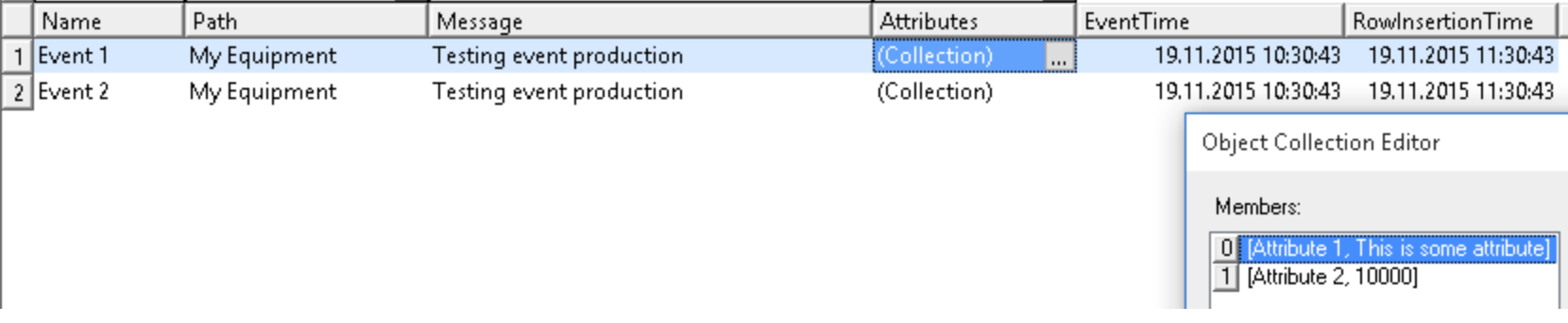
The events are produced to a table called EquipmentEventLog. In Vtrin you can see the events from Maintenance -> System -> Equipment Model Configuration -> Equipment Events.
Functions
EqM API supports function calls from the server to the client, and returning the return value back to the server. This client API allows to specify normal C# functions to be called from the server through the EqM API.
Function call example
Similar to the previous examples, the functions need to be defined in the constructor of cEquipment. Due to technical limitations of the C# language, the functions then need to be wrapped into **System.Func**objects. The following example defines a function called SumOfTwoValues and assigns it to the cEquipment object.
static double SumOfTwoDoubles(double a, double b)
{
    System.Console.WriteLine("SumOfTwoDoubles ({0} + {1}) called", a, b);
    return a+b;
}
And later on before creating the cEquipment object:
var myfunctions=new System.Delegate\[] {
    new System.Func\<double, double, double>(SumOfTwoDoubles)
};
var eq=new ABB.Vtrin.Drivers.cMiaClient.cEquipment(equipmentid: new System.Guid("f91fb037-f1f4-44c5-a800-6e85ff0ec811"),
equipmentname: "My Equipment",
equipmenttype: "My Equipment Type",
properties: myeqprops,
events: myevents,
functions: myfunctions);
Also now the program needs to be running while the function is being called. One quick and easy thing to do is to remove the AutoResetEvent usage, and use System.Console.ReadKey() at the end of the main function instead.
Now, when the connection is open and the server calls a function, the SumOfTwoDoubles function will be run with the arguments and the result returned back to the server. If the connection is not open while the function is called, it will be queued so that it will be called right away when the client next connects to the server with SubscribeEquipmentSession.
Tutorials
We have gathered VtrinLib application examples under one how-to tutorial. You may find the examples here.
Recommended reading
- Vtrin Server article : Vtrin Server is the service that provides remote access to the Vtrin user interface client.
- Equipment Model article: The Equipment Model is one example of dynamic object models exposed by VtrinLib.
- Processing data section: This section describes how to refine the raw time series data to aggregated values that are needed in dashboarding and reporting.
- Software stack article: This article gives an overview of the layered architecture of ABB Ability™ History along with the Data Abstraction layer (VtrinLib).
Updated 9 days ago