
Equipment model
This article will give an overview of our Equipment Model concept
Equipment Model is a predefined meta information model in ABB Ability™ History for modelling industrial assets and processes and implement applications against them. Equipment model provides a way to model real-world assets, describe processes and implement applications. Equipment model has built-in support in time series handling and there are lots of support in tooling for equipment model engineering starting from data acquisition and ending up to calculations, visualization, public APIs, and external systems data transfer.
Please find further information on time series handling under time series concepts.
Inheritance
Equipment model supports inheritance to enable model type hierarchies between similar types of equipment. Inheritance allows common properties to be automatically available for all the inherited types. For example a base equipment type could be an "electrical apparatus" from which "electric motor" is derived from and this could further be inherited as a "low voltage motor". We will look at an example further below.
Hierarchies
Furthermore equipment instances can be organized in hierarchies for multiple purposes. Each equipment is referred to as an instance and each instance of an equipment model type is placed at least in one logical hierarchy. The purpose of this logical hierarchy can be a process hierarchy, locational hierarchy, or any logical or natural hierarchy. As an example, a hierarchy can contain process paths like Site.Production line.Process unit.Equipment. Also additional hierarchies can be created for other purposes.
Other major advantages
- The unified equipment model presentation reduces efforts while communicating between systems and subsystems.
- The ability to collect time series history for an equipment property is one of the major advantages when considering the adoption of the Equipment Model.
- It also allows the dynamic addition of new properties to production systems, simplifying the deployment of new features. Adding new equipment instances to an existing system is also straightforward.
- The default values defined in the equipment model configuration serve this purpose together with pre-defined history data collection attributes.
Modeling
In the picture below you can see an example setup of two processes; Process A and Process B.
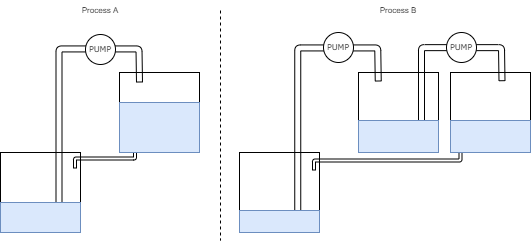
Here we start the equipment modeling by creating equipment for the devices of both processes. From there we can add properties such as "manufacturer", "power" and "pump".
Actual equipment instances can be created from the models and organized to hierarchy. Equipment model hierarchy for the above process could look like this:
Water transfer system
├── Process A
|   ├── Tank section
|       |   ├── Source tank
|       |   └── Target tank
|       └── Pump section
|           └── Pump
└── Process B
    ├── Tank section
        |   ├── Source tank
        |   ├── Middle tank
        |   └── Target tank
        └── Pump section
        	├── Pump 1
            └── Pump 2
Example model
Examples of Equipment Model definitions and properties will be further discussed in Example Equipment Models Model Definition section.
But first we will go through general configuration settings for creating an Equipment Model.
Equipment model
An Equipment model has the following attributes:
| Name | Type | Description |
|---|---|---|
| Name | string | The name of the Equipment Model |
| Base | ABB.Vtrin.Interfaces.IEquipment | The parent equipment from which equipment properties will be inherited |
| Abstract | boolean | Abstract is to indicate that the instances should not be created from this generic model, but only from those inheriting it. |
Equipment model class definitions
Equipment model can be configured in Engineering UI with following definitions.
| Attribute | Type | Description |
|---|---|---|
| Name | String | Name of the equipment type. E.g., Tank, Valve, Compressor |
| Base | Guid | Name of the base class. May be chosen from dropdown menu. Properties of base class will be inherited. |
| Image | Enumeration | Image for equipment type. Appears in front of the name. |
| Abstract | Boolean | Abstract is to indicate that the instances should not be created from this generic model, but only from those inheriting it. See our Example Equipment Model for further information. |
| Command | Boolean | Command classes are used to model server-side executable commands and to execute them. Data classes are used to model data and to provide access to the instances and their properties. |
| ClassName | String | Class name of model (E.g., Path_Tank) |
We will look more into these in our Equipment Model example.
Equipment property
Equipment properties are data type specifications for the equipment model properties. For example, a real life pump may have an equipment model "Pump". Then, equipment property of the pump could be "Nominal power" that defines a numerical property and has a unit "W". The Equipment Model supports multiple data types, which can be found from the Supported data types table below.
Equipment property definitions
The equipment property has several attributes and they are listed below.
| Attribute | Type | Description |
|---|---|---|
| DisplayName | String | The name of the equipment property |
| Historized | Boolean | Tells whether the property's history data will be collected or not. |
| Data Type | Enumeration | The type of the equipment property. See supported data types below. |
| ValueMin | Double | The minimum value of the property. |
| ValueMax | Double | The maximum value of the property. |
| Unit | String | The unit of the equipment property. |
| Category | String | Category of property. Shown in property settings menu. E.g., "General information", "Calculated", "Performance parameter". |
| Description | String | The description of the equipment property. |
| Application Type | String | Identifies the application usage type of the property. Please see longer explanation below.* |
| Reference Target | String | When creating reference properties of type GUID, the path of an object that property is related to. E.g., Class:Path_Pump. |
| Compression Method | Enumeration | Defines if data is compressed when stored to history. Please note: if properties are used and calculated in calculations, it strongly recommended not to use compression method. See further notes for calculations here. |
| Target History | History | CurrentHistory: optimized for frequently updated history values. Recommended to use for calculated values. More information on calculation concepts. StreamHistory: optimized for write once and read frequently type of use. It is aimed for measured signal storage that is not subject for later maintenance. More information on history tables. |
| History Collection Templates | String | Defines chain of histories to be collected. Available collection chains are defined in "HistoryCollectionTemplate" class. |
| Max Array Length | Uint | For array variables, the maximum length of the array. Array variables can only be stored in a StreamHistory table. CurrentValues for this variable will be stored in a CurrentValues table of the appropriate size, aligned to a power of 2. |
| Variable Length Array | Boolean | For array properties, indicates that the property will receive arrays of variable length and will optimize space usage accordingly. |
| Max String Length | Uint | For text type and array of text type variables, defines the maximum length of the value in Unicode characters. The maximum possible setting is 2040. |
| Status Storing | Enumeration | Stream history setting. Defines whether to store statuses on a pre-cluster of per-value basis. |
| Timestamp Storing | Enumeration | Stream history setting. Defines whether to store timestamps on a per-value basis. |
| Stream Compression Method | Enumeration | Defines how stream history data is compressed. LZW Compression = lossless data compression. |
| Period Length | Uint | Defines period length for data saved to stream history. Max value is 4,294,967,295. |
| Period Length Unit | Uint | For variables being recorded to a StreamHistory table with per-block timestamp storing, defines the time interval with which values are recorded into history. For best results, it should be as close to the actual frequency of values produced as possible. |
| IsNullable | Boolean | Specifies whether the property can contain NULL values or not. Only applicable for non-historized properties. |
| Equipment | ABB.Vtrin.Interfaces.IEquipment | Tells which equipment property is related to. |
*Application Type: If the value is nonzero, a special action is performed when data is produced to the property as the current value or via the history maintenance. The ApplicationType = 1 indicates a property that holds a production grade identifier, and causes activations of the RTDB-GradeServer service.
Supported data types
These are all the data types that the equipment property supports.
| Type | Range | Max array length | Max string length |
|---|---|---|---|
| boolean | false .. true | 16340 | |
| byte | 0 .. 255 | 16340 | |
| uint16 | 0 .. 65536 | 8170 | |
| uint32 | 0 .. 4294967295 | 4085 | |
| uint64 | 0 .. 18446744073709551615 | 2042 | |
| sbyte | -128 .. 127 | 16340 | |
| int16 | -32768 .. 32767 | 8170 | |
| int32 | -2147483648 .. 2147483647 | 4085 | |
| int64 | -9223372036854775808 .. 9223372036854775807 | 2042 | |
| single | -3,402823E+38 .. 3,402823E+38 | 4085 | |
| double | -1,79769313486232E+308 .. 1,79769313486232E+308 | 2042 | |
| DateTime | 1601-01-02 00:00:00 UTC .. 9766-12-31 23:59:59 UTC | 2042 | |
| TimeSpan | -10675199.02:48:05.4775808 .. 10675199.02:48:05.4775807 | 2042 | |
| GUID | 1021 | ||
| byte[max] | 0 .. 255 | 264 | |
| string | 0 .. 2097151 | Not supported | 64 |
| string(size) | 0 .. 2097151 | Not supported | 5443 |
| string(max) | 0 .. 2097151 | Not supported | 264 |
| string(max)[max]** | 0 .. 2097151 | 5440*** | 5440*** |
Notes:
- *Max string and array lengths are for the ABB Ability™ History default configuration and can be altered from the database configuration.
- **The current version of ABB Ability™ History does not support history collection for string(max)[max] properties.
- ***The string(max)[max] combined size is limited to 16340 bytes. BLOB storage is currently not supported.
Maximum string and array lengths
For strings, the maximum value is the maximum supported Unicode character code. Strings use 1-3 bytes per character, depending on the character code + length.
For arrays, the length must be specified as in [], e.g., int32[512] to get an array of 32-bit integers with a maximum length of 512.
The maximum array/string length does not affect the disk space consumption for values in history but does affect the disk and memory consumption of the property, so it is recommended to keep it reasonable.
Referencing other equipment
To create more complex structures than a tree hierarchy, the equipment property definitions support the use of references. In other words, an equipment property can point to other equipment of the selected type. This is done by creating it as type GUID. This type of reference property can be used to tie together, for example, a pump and the tanks it is connected to, just like in our equipment model tutorial. However, it is up to the application logic to decide how the references are defined.
To do this in our Engineering UI, we first create a reference property in our Equipment Classes display as a GUID type property and add the pointed Equipment class in the reference target column (Example shown in the Equipment Property definitions table above). After this referencing can easily be done under the Equipment List display by adding the process path of the referenced Equipment to the value cell of the particular instance.
Instance references can be used to make links between equipment instances. They allow the construction of different topologies, such as networks and graphs. By default, each equipment instance has one parent instance, except for the root node. Instance references can be used to refer to certain types of instances including such instances that have been inherited from the original referenced model.
Equipment instance
Equipment instance is a representation of the real-world equipment. In our example process, where the pump is moving water from a tank to another through pipes, each of the tanks, pipes, and the pump would have their own equipment instance.
Equipment instances are stored in the primary hierarchy that is called Path. Each equipment model has a virtual class that collects all its instances and they are accessible through the data abstraction interface VtrinLib. The naming convention has the syntax "Path_[Equipment model]", e.g., "Path_Pump".
Equipment instance names support categorization by their nature. By naming a tank, for instance, to "Example site.Water transfer system.Tank area.Tank 1" will generate a tree with a similar structure. Multiple pieces of equipment together can generate the following kind of tree structure.
Example site
└── Water transfer system
    ├── Tank area
    |   ├── Tank 1
    |   └── Tank 2
    ├── Pump section
    |   └── Pump
    └── Tank
Equipment Instances will be further explained in our Example Equipment Model's Equipment Instance section.
Defining Instances
The table below shows the default settings for each instance. In addition, the datalist may show inherited properties and properties we have created for our model.
| Attribute | Type | Description |
|---|---|---|
| Process Path | String | Hierarchical name with point notation, e.g., Plant.Department.Process.SubProcess.Equipment |
| Name | String | Name of our instance, e.g., Equipment |
| Parent | Path | Reference to the Parent in the Path, e.g., Plant.Department.Process.SubProcess |
| Equipment | Equipment | Reference to the equipment definition in Equipment Class i.e. Name of our Equipment model. |
| References | String[] | Reference values to variables or other instance properties. For properties: ReferringProperty:/TargetClass[TargetProperty]/TargetId|TargetName, for variables: MyProperty:/Variable/|VariableName. Further information. |
Reference for GUID properties
Please note: if you have GUID properties, write their process path on the property value cell as well (For example For GUID property Source Tank the path would be site.Tank area.Source Tank). In latest versions, system shows path options in dropdown menu automatically.
Property value
Property value is an equipment instance specific property value that can also be a time series (historized property).
Overriding property attributes
It is also possible to override the default property attributes on an instance level. Such are:
ValueMinValueMaxUnitEventsTargetHistoryHistoryCollectionTemplatesCompressionMethodCompressionErrorSubstituteMethodSubstituteValueRecordingMethod
List of Equipment property attributes
Behavior pattern – EquipmentPropertyInfo holds the list of equipment property attributes with default value, and description whether they can be overwritten. Overwritten attribute values are stored in EquipmentPropertyValue.
- Overwritten properties can be set at runtime and are taken into account respectively
- All the behaviors for property attributes will act accordingly: if overridden, related property attribute is seen as stated in the instance, if not – as stated in the class definition
- If override property is deleted from the instance, related behaviors restore to act based on the class definition.
EquipmentPropertyInfo attribute override in Engineering UI
Overriding property attributes in Engineering UI is simple and allows you to do changes on Instance level. Yet these changes require a few things we will go through below.
First to see all the EquipmentPropertyInfo attributes we go to Information Model > Database classes. On this table we can see all property names grouped by classes.
To see only a list of EquipmenPropertyInfo attributes and all their detailed information, we can first choose Class from dropdown menu and in our case it will be Class Property. Then to the search box on Class Name column we will type EquipmentPropertyInfo. The Name column shows us how the names are written in code. This information we need in the next phase.
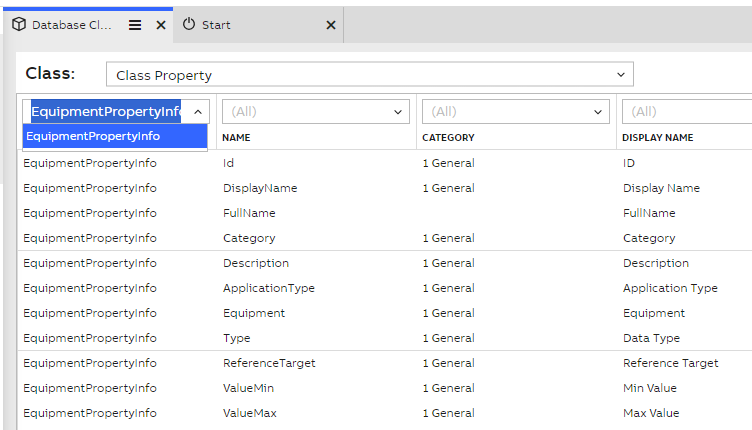
Database classes EquipmentPropertyInfo selection
Now on Engineering UI main menu we can select Information Model > Equipment Classes and here choose the Equipment Model property we want to modify. Then we open the property editor tool window and here we can see the property attributes.(see picture below). On default this is empty, but we can insert here the attributes we want. Please be advised to type the names as they are displayed on the Database classes EquipmentPropertyInfo Name column. Example shown below. Remember to commit changes to save them.
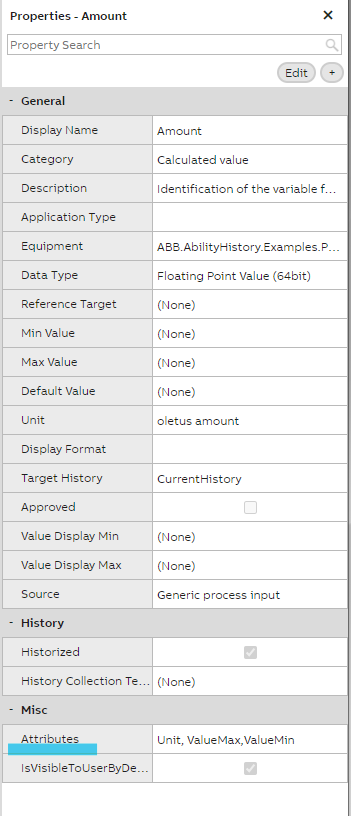
Property editor list
Lastly we can go to our Information Model > Equipment List display and here open the Equipment Model property editor to see the attributes we just added. If some of these were already defined when creating the model, the values will be shown here. Otherwise these are marked as "undefined" or simply empty. If you define overriding attributes to multiple properties, these will all be listed here.
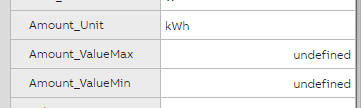
Attribute definitions example on Instance level
Equipment Model example of attribute override
Our example equipment model has an equipment type Pipe, from which two equipment instances, Main pipe and Flowback pipe, are created. The Pipe type has a property Flow, which tells how much liquid can flow through the pipe per minute. The ValueMax attribute for this property is set to 1000, which sets the maximum limit for the property's value to 1000 l/min.
The maximum flow for Main pipe is 1000 l/min, so this needs no changes. However, the maximum flow for Flowback pipe is 100 l/min. We'll use a property attribute override to set ValueMax to 100 for Flowback pipe.
The picture below illustrates the attribute property override behavior. On the left, no overrides have been defined for the Main pipe's Flow property, and therefore ValueMax gets its value (1000) from the equipment property definition.
On the right, a property attribute override has been defined for Flowback pipe's Flow property. Therefore, the ValueMax attribute gets its value (100) from the override, instead of using the value from the equipment property definition.
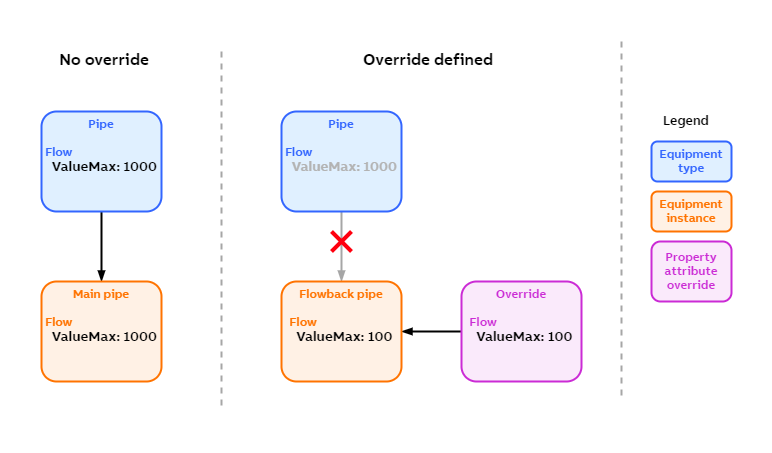
Property attribute override behavior.
Code example
In our calculation UI the code would look like this:
string attributedname = "attributed";

var instance = mSource.Classes["EquipmentPropertyInfo"].Instances.GetInstanceSet("DisplayName=?", attributedname)[0].BeginUpdate();

instance.SetRawPropertyValue("Attributes", "ValueMin,ValueMax"); //override attributes
instance.CommitChanges();
mSource.EventBarrier();

var car = mSource.Classes["Path"].Instances.GetInstanceByName("Garage.InstanceName ");
Assert.IsNotNull(car.Class.GetProperty("attributed_ValueMin")); //overridden property
Data source attribute
One use of property attributes is the data source attribute. It is used by data providers such as OPC UA Client to preserve the original data source for the property. Usually this information is accessible in Data Access Sources -table but the property attribute can write this information to the Equipment instance. This allows the information to be published with Netsync to other systems. The syntax for the data source field value is the following
<base datasource name><--<base datasource name><--<data provider>:<data provider path>for example a property MotorSpeed can have a value of 15 and it has an attribute called datasource which has a value of:
site/d:\rtdbdata<--collector/d:\rtdbdata<--OPC_UA:opc.tcp.//192.168.1.6:48010///Data.Scalar.DoubleTo get this feature into use add 'DataSource' text content to the EquipmentPropertyInfo's property 'Attributes'. This setting should be done for all those properties where you want original datasource to appear as part of Equipment model.
Multiple instance hierarchies
In addition to the main hierarchy, it's also possible to organize equipment instances into secondary hierarchies. This way, it's possible to have different views on the same equipment, each suitable for a different use case.
For example, the primary hierarchy can be organized to represent the physical layout of the equipment on the site, and your site could look as follows:
Example site
├── Area 1
|   ├── Tank section
|   |   ├── Source tank 1
|   |   └── Target tank 1
|   ├── Pump section
|   |   └── Pump 1
|   └── Pipe section
|       ├── Main pipe 1
|       └── Flowback pipe 1
├── Area 2
|   ├── Tank section
|   |   ├── Source tank 2
|   |   └── Target tank 2
|   ├── Pump section
|   |   └── Pump 2
|   └── Pipe section
|       ├── Main pipe 2
|       └── Flowback pipe 2
├── Area 3
...
In the above primary hierarchy, all equipment instances are placed under the areas they physically belong to.
If in addition to the primary hierarchy, we'd like to see our equipment grouped by their type. We could define the following secondary hierarchy:
├── Pumps
|   ├── Pump 1
|   ├── Pump 2
|   ...
└── Tanks and pipes
    ├── Source tank 1
    ├── Target tank 1
    ├── Main pipe 1
    ├── Flowback pipe 1
    ├── Source tank 2
    ├── Target tank 2
    ├── Main pipe 2
    ├── Flowback pipe 2
    ...
In the hierarchy above, we have to categories: Pumps and Tanks and pipes. We could just as well have defined a hierarchy with the categories Pumps, Tanks, and Pipes. How you want to define these hierarchies depends on your use case and what best serves your needs.
Updated 16 days ago
What’s Next
Get started with the equipment model by completing our Equipment Model tutorial series.