

Implementation displays in Engineering UI
Definitions
This display allows you to monitor Calculation definitions in one table.
| Property | Data type | Description |
|---|---|---|
| Name | String | Name of the calculation in Calc Catalog. Must be unique. |
| Description | String | Optional description of calculation. |
| Code | String | The code for the calculation. |
| CodeType | Enum | The type of code in the code property. Currently it can be C# or Simplified C#. |
| Disabled | Boolean | If set to true, calculations based on this Calc definition will be suspended. |
| ErrorMessage | String(json) | Will contain any errors/warnings encountered during the compilation of this Calc Definition in JSON format. In case of a successful compilation, the errors array will be empty. In case of a successful compilation, the errors array will be empty. |
| CompilationStatus | Enum | Shows if compilation was successful or failed. |
| LastCompilationTime | DateTime | Shows timestamp when compilation was successful last time. |
| Group | String | Shows user group allowed to see and modify the calculation |
Parameters
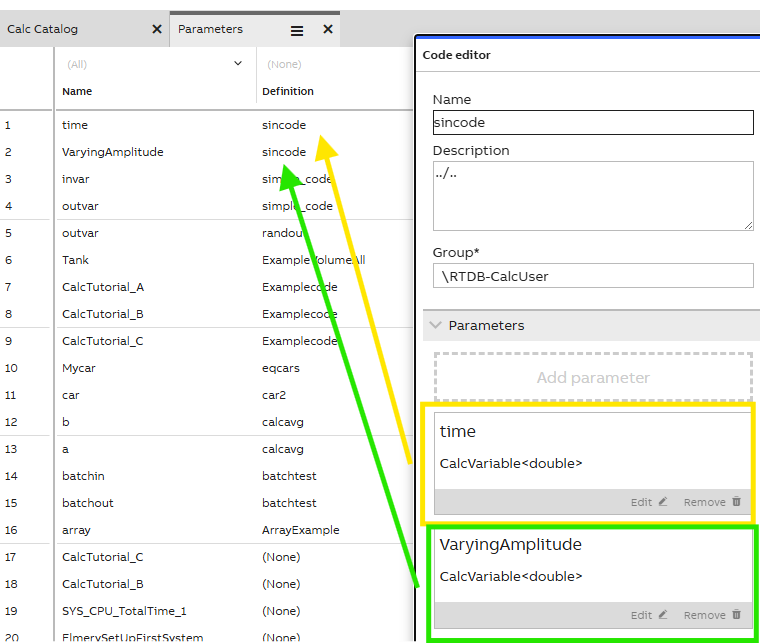
This display shows input and output parameters and allows you to monitor them. These are visible in the code editor.
| Property | Data Type | Description |
|---|---|---|
| Name | String | The name with which the parameter is used in the CalcDefinition code. |
| Definition | ref. CalcDefinition | Reference to the CalcDefinition (code name) to which this parameter belongs. |
| Type | ref. CalcParameterType | Reference to the CalcParameterType that defines the compile-time type of this parameter. |
| ArrayDimensions | Int32 | The number of desired array dimensions in the parameter type. If the parameter is not supposed to be an array, set to 0. |
| IsOutput | Boolean | Shows whether this parameter is an output or not. |
Parameter Types
This display allows you to see list of parameter types. These are generated by the Calc Engine backend.
| Property | Data Type | Description |
|---|---|---|
| Name | String | Descriptive name for the type |
| TypeName | String | String passed to System.Type.GetType() to get the represented .NET type. Not used when EquipmentType != null. |
| EquipmentType | ref. Equipment | If not null, represents the Equipment for which this type is a helper class. |
| EquipmentDataSource | ref. CalcDataSource | Data source of the calculation. |
External Libraries
This display allows you to monitor and configure External Libraries to be available for your calculation.
CalcExternalLibrary is a new Calculation Tool class that provides support for using third-party code in the calculations. This class resides under the Implementation group in the navigation tree. See further information and examples in our using third-party code article.
| Property | Data Type | Description |
|---|---|---|
| Name | String | The name for this external code link. It must be unique. |
| Type | enum Calc External Library Type | The type of the external code link. It defines what field will be read when registering this third-party code and can either be Code Snippet C# or DLL (File Path). |
| CodeSnippet | String | This field holds the third-party code, if the type was selected as Code Snippet C#. |
| DLLPath | String | This field holds an absolute path, a relative path from the Vtrin installation directory, and an environment variable path to the compiled third-party code if the type was selected as DLL (File Path). |
Updated 1 day ago
Did this page help you?