

High availability
ABB Ability™ History supports high availability configurations where two history nodes replicate data between each others and form one high availability database.
Concept
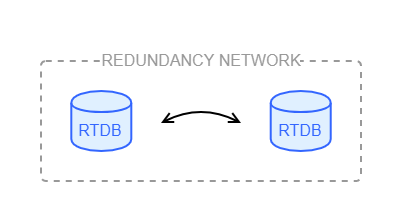
Two History nodes are connected with a high-speed network to replicate data online and check their data consistency with each other. Nodes are equal - no primary and secondary relationship.
System requirements
Requirements to run a high availability system:
-
It is recommended to have a dedicated, isolated 1GB network between the nodes for redundancy communication. The redundancy communication is not throttled and sometimes the load is significant and may cause disturbance to other traffic. In physical systems the idea would be a direct network cable between the computers, in virtual systems similarly protected and shielded network must be available. Having UDP and Multicast communication would be desirable, but TCP/IP can also be used (but its overhead is larger).
-
The operating system features MSMQ-Multicast and MSMQ-Server need to be enabled to enable PGM protocol (Pragmatic General Multicast). However, this is not needed if TCP/IP communication is used instead (TCP/IP will have larger overhead).
-
System clocks in redundant nodes must be synchronized and not to differ more than 1 second from each others.
-
Redundancy requires more CPU power in order to maintain the CRC indexing during writing data, and to manage replication of data between the computers. The actual increase is not large, but in order to achieve the same storing speed as for non-redundant systems, especially the single core processing power is important because of the additional low level table page locking activity during the data storing.
Redundancy requires also more disk space to store RowModificationTimes and CRC indexes (in CurrentHistory style data, the increase is about 20%, in StreamHistory data, the increase is minimal, less than 1%).
There are not strict requirements for the system resources, i.e. CPU, RAM, and disk IO, but as a rule of thumb, there should be about 50% more resources than what would be enough for a single-node node system. On the other hand load sharing is then potentially providing better performance in redundant configuration. -
It must be possible to exclude the database and backup directories from virus scanner software. Any hardening on top of the operating system installation must not be enforced.
Behavior of the system
Core concepts
High availability in ABB Ability™ History means that two nodes are continuously striving to have the same data available. The redundant nodes are replicating the input data streams to each others to record the same time series histories. To ensure the consistency of the data, separate checking and fixing of the data content is performed continuously.
The redundancy works at the database table level. Each database table can be configured to be redundant and under consistency control or not. If a table is not under consistency control, it is not affected by redundancy at all. Typically in a redundant system most tables are defined to be redundant. To make a table redundant means two things; the table has to have the special index called the ‘Cyclic Redundancy Check’ index (CRC-index), and it has to have the column ‘RowModificationTime’ (RMT), which stores the time when the database row has last been modified.
There are two services that are responsible for keeping redundant data in a consistent state. RTDB-CVMCServer is replicating the input data stream, and RTDB-ConsistencyController is performing the consistency checking and fixing. Figure 7.1 illustrates the components in redundant nodes.
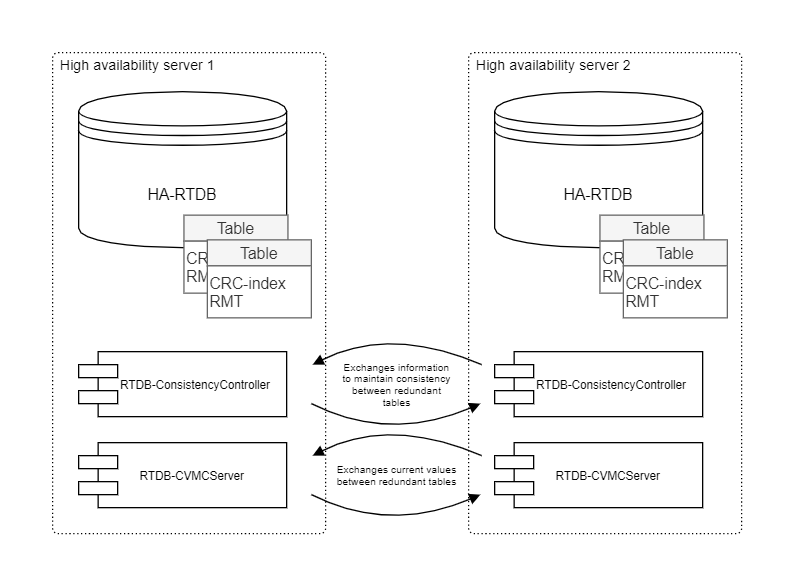
RTDB-ConsistencyController and RTDB-CVMCServer can be configured to use different communication communication protocols for exchanging the data (UDP multicasting, Pragmatic General Multicasting (PGM), or TCP/IP). Currently, the High Availability is defined to support two redundant nodes (one-out-of-two), but the architecture is not limiting to have more nodes, e.g. one-out-of-four.
RTDB-ConsistencyController provides some additional services that are needed to support application redundancy. These services are presented in detail in section Services.
Deterministic data production
It is beneficial in a high availability system to be able to produce data deterministically. The ability to do this can reduce the overall load, as data production can be independent in both main nodes, and optimized based on the protocol used to produce data. However, this is often not possible, for example, because the protocol used to fetch data from the original source is based on non-deterministic polling. In the worst-case-scenario, running two non-deterministic data links to collect data from the same data source in redundant servers would produce double the amount of data, and thus affect the performance of the system. From a functional perspective as well, this would be something that is not desired.
In case deterministic data production is not possible, it is better to run the data production only in one node at the time. The redundant configuration provides two functionalities to implement a service to run in one node at the time. First is so called "service group", i.e. the service is controlled by RTDB-ServiceManager and started only in one node. The other alternative it that the service is synchronizing its operation by itself. This concept is called the "master token".
Using the master token, a service can control its operation to do tasks in only one node at a time. All data links that are available in the standard setup (VtrinLink, RTDB-EcOpcClient, RTDB-EventForwarder, and RTDB-TagConsistencyController) are implementing the master token to restrict the production of data in only one node at a time. The nuances of the master token handling are described in section Optimization primitives.
Transparent data access
Clients would like to have transparent data access to the high availability History and automatic changeover to the other node in case of a failure. This transparency can be achieved with two ways:
-
Using Windows Network Load Balancing (NLB) that defines common IP address for the two nodes. (Note that installing NLB is currently not done automatically.) When NLB is installed, the priority is set to define where data is fetched from, if both redundant nodes are available. After installation, the NLB configuration is available in Windows in "Administrative Tools\Network Load Balancing Monitor". The priority can be changed later on. If the primary node is shut down, the context switches to the secondary node but returns back to the primary node when it is started again. However, the current implementation is not able to change the NLB context when RTDB is shutdown without shutting down Windows. In this scenario, the NLB context can be changed manually from the NLB Manager.
-
VtrinLib contains automatic load balancing and change-over functionality in HA configuration. All clients and APIs based on Vtrinlib and connect to one of the HA nodes get automatically informed that there is also redundant node available, and in case of failure the changeover to the other node takes place automatically. There is also load balancing functionality, i.e. when the client tries to connect to an HA node, it may be redirected to a redundant node with lower load.
Optimization primitives
The Master Token is a mutual exclusion lock mechanism that can be used in High Availability systems. An application can request a Master Token by name, and the RTDB-ConsistencyController takes care that only one application instance holds the Master Token (unless configured to allow multiple instances).
Master Tokens are also known as “Services” and they can be fine-tuned using the class "Service". (Available in the 'RedundancyControl' diagnostics display, documented in section Redundancy control displays). It contains a list of the master tokens currently used and the host where the owning application is currently running. There are also four bit-values that affect the behavior of the application.
- "Allow Multiple": When set to true, disables the master token functionality and lets affected services to execute tasks protected by the master token simultaneously. By default, this is set to false for all services.
- "Auto Failback": When set to true, the ownership of the master token is always given to the higher priority node as soon as possible. For example, in case the primary node is shut down temporarily, and because of this, the master token context changes to the secondary node, it would be returned back to the primary node as soon as the primary node has been started, and RTDB services are available.
- "Disable Inheritance": It is up to RTDB-ConsistencyController to provide the master token services. To be able to ensure the atomic behavior, i.e., the task protected by the master token is executed on only one machine at a time, and it has to communicate over the redundancy network with the RTDB-ConsistencyController in another node. "Disable inheritance" defines the behavior in the situation where the RTDB-ConsistencyController in one node loses the connection to the RTDB-ConsistencyController in another node. In this situation, the master token is given for the components in both nodes if the value is false. If the value is set to true, the service continues to run in the original node only. The reason why the instances of RTDB-ConsistencyController could not communicate with each other could be network failure in the redundancy network, hardware failure, or software bug. By default, all other services except for RTDB-TagConsistencyController have "Disable Inheritance" set to false. Configuration of the database, which RTDB-TagConsistencyController is automatically doing, is in some parts relaying the assumption that tags and variables are always created in only one machine at a time, and not while the communication in the redundancy network is broken.
- "Release Requested": This is a request to the application to release the ownership of the master token and go idle or shutdown (the in-detail behavior is application-specific).
Sync Halt provides a mechanism to pause the synchronization of a specified table for a given time period. This is purely an optimization mechanism for data links that are inserting data into the database. Allowing RTDB-ConsistencyController parallel access to the table, while the data link is doing updates, causes non-optimal overall system behavior. This mechanism is used at least in VtrinLink, RTDB-CVMCServer, and in RTDB-TagConsistencyController.
Sync Barrier provides a mechanism to ensure that the specified database table is synchronized to have the same data available in both redundant nodes before continuing the operation. Behind the scenes, RTDB-ConsistencyController raises the priority of synchronization for that table to reach consistency as soon as possible.
Configuration
There are a few places that contain configuration for high availability servers. RTDB.ini contains the following lines.
[General]
ConsistencyControl=ON
This defines that the node is a high availability node.
SimpleConfig contains many low-level settings that affect the functionality and performance of RTDB-ConsistencyController. Most of the settings are such that they should not be changed without a deep understanding of RTDB-ConsistencyController. One parameter that can be changed is MasterTokenTrace (default value 0). Setting this value to 1 starts tracing the master token related information e.g., into the log file: %APP_DATAPATH%\diag\RTDB-ConsistencyController D RTDBData.log
Diagnostics
Log files
The RTDB-ConsistencyController log file is available in %APP_DATAPATH%\diag\RTDB-ConsistencyController D RTDBData.log
Windows event log
The Windows event log is used to log possible PGM errors that could indicate problems in the redundancy network.
Redundancy display in Engineering UI
This display helps you manage and monitor service redundancy across multiple servers. It shows which service runs on which node, its role (Primary, Secondary, etc.), and how synchronization between nodes is progressing. Data in this display is available only if the database is configured for High Availability (HA).
Redundant Servers (Read-only)
This display shows the two servers that form the high availability main node pair. It includes their names, IP addresses, and the communication status between RTDB-ConsistencyControl services. Normally, both nodes show Synchronizing when communication is OK. If there is a problem, the status will indicate it. The LastSyncTime shows when the services last communicated.
| Attribute | Type | Description |
|---|---|---|
| Host Name | String | Name of the server. |
| Status | Enum |
Current status of the server:
|
| Last Sync Time | Datetime | Timestamp of the last successful synchronization. |
| Address | String | IP address of the server. |
| Last Contact | Datetime | Timestamp of the last communication from the server. |
Table Status (Read-only)
This display shows the consistency status for each table that is under consistency control. It displays table names and their status code in the Status property. Each code tells if the table is synchronized or has problems.
| Attribute | Type | Description |
|---|---|---|
| Id | String | Table identifier |
| Status | Enum |
Current status of the redundancy table:
|
| Last Action Time | Datetime | Time of the last operation on the table. |
| Last Sync Time | Datetime | Time of the last successful synchronization. |
| Rows Received | Int64 | How many rows were received during synchronization. |
| Rows Sent | Int64 | How many rows were sent during synchronization. Rows are sent as a response to Row Request message or after a Row Data message after finding that the local table has newer row that the received. |
| Has CRC Index | Boolean | Indicates whether the table has a Cyclic Redundancy Check (CRC) index, which is required for consistency control. Tables with this index can be checked for data integrity during synchronization. |
| Has Row Modification Time | Boolean | Shows if the table shows when each row was last changed. |
| Has Auto Number Columns | Boolean | Shows if the table has columns that auto-generate numbers (like IDs). |
| Deletion Log | Boolean | Shows if the table keeps a list of deleted rows. |
| Comments | String | Notes about the table. |
| Table CRCs Received | Int64 | How many full table checksums (CRC) were received from the other node. The message contains also the CRC of the default row. |
| Range CRCs Received | Int64 | How many checksums were received for specific row ranges. These are used for searching where the tables differ. Special: the count increases also when CC sends a "fake" message to itself, after receiving a Table CRC message that indicated that the tables differed (this behavior might be changed in a future version). |
| Row Requests Received | Int64 | How many row requests were received from the other node to synchronize a range of rows. |
| Deletions Received | Int64 | How many delete operations were received from the other node to keep data consistent. |
| Default Rows Received | Int64 | How many default rows were received for the table. |
| Table CRCs Sent | Int64 | How many full table checksums (CRC) were sent to the other node. CC cyclically (according to parameter "TableCRCSendInterval") sends table CRCs to other node. |
| Range CRCs Sent | Int64 | How many checksum validations were sent for specific row ranges. Sending of RangeCRC messages is triggered when the incoming TableCRC or RangeCRC message indicates that the local range of rows differ. This includes also the fake RangeCRC sending (see "Range CRCs Received"). |
| Row Requests Sent | Int64 | How many individual row requests were sent to the other node for synchronization. Row requests are sent as a response to RangeCRC message after locating a small enough differing range of rows. |
| Deletions Sent | Int64 | How many delete operations were sent to the other node to keep data consistent. Deletion command is sent if the CC detects that the arriving rows have been deleted from the local database, according to the CoreDeletionLog. |
| Default Rows Sent | Int64 | How many default rows were sent. The default row is sent if the Default row CRC in the incoming TableCRC message of the default row differs from the local copy. |
| Received Rows Discarded | Int64 | How many received rows were discarded because the local copy was already same. To figure out the number of rows that were actually useful, you need to calculated "Rows Received" minus "Received Rows Discarded". |
| Resume Time | Datetime | When syncing will resume after a pause. |
| Row Modification Time | Datetime | Time when a row was last changed. |
| Attribute | Type | Description |
|---|---|---|
| Name | String | Service name (read-only) |
| Host Name | String | Server where the service is currently running (read-only) |
| Allow Multiple | Boolean | If true, disables Master Token exclusivity and allows the service to run on multiple nodes simultaneously. Default: false. |
| Auto Fallback | Boolean | Automatically returns the Master Token to the highest priority node when possible. If set to true, this requires Operating Mode priorities to be defined in Service Instances. |
| Disable Inheritance | Boolean | Prevent the service automatic start if connection to current server is lost |
| Shut Down | Boolean | Request the service to shut down |
Service Instances
This display shows node-specific information for the same services listed in the Services section. Each instance represents how a service is running on a particular node.
Instances cannot be added or removed through this view; they are defined during installation.
Only the Operating Mode attribute is editable; all other properties are read-only.
| Attribute | Type | Description |
|---|---|---|
| Service | String | Service linked to this instance, selectable from the list (read-only) |
| Host Name | String | Server where instance is running (read-only) |
| Operating Mode | Enum |
Role of the instance:
|
| Active | Boolean | Indicates if the instance is currently running (read-only) |
| Start Time | Datetime | Timestamp when the instance started (read-only) |
| Process ID | Integer | Process identifier of the running instance (read-only) |
| Attribute | Type | Description |
|---|---|---|
| Name | String | Name of this database node |
| Description | String | Description of the database node |
| Parent | Guid | If this node belongs under another node in a hierarchy, this is the reference to that parent |
| Type | Enum | Type of the database node: Main, Data Collector, or AbilityCloud |
| Has Sub Folders | Boolean | Indicates whether this node has children or not |
| TCC Enabled | Boolean | Indicates whether Tag Consistency Control is enabled for this node |
| Collect Secondary Logs | Boolean | Defines whether History collection is performed in this node |
| Computer Name | String | The computer name of the node. Must match the system variable COMPUTERNAME |
| IP Address | String | IP address of this machine in numerical format (e.g., 12.12.12.12). |
| Data Source Name | String | Vtrin data source name (e.g., tcp://12.12.12.12/myrtdb). |
| High Availability | Boolean | Indicates if this entry describes the virtual common data for the redundant Main server node. |
| High Availability Node | Guid | Refers to the entry that contains the virtual node with HighAvailability = True |
Further reading
Installing DCN (Data Collector Node) of a Hierarchical System
Learn how to install a DCN on Windows and understand hierarchical architecture here.
Hierarchical Systems and Tag Consistency
Learn how DataBaseNode works with the Tag class to enable structured data collection, redundancy, and keep tag definitions automatically synchronized across all nodes here.
NetSync and Equipment Publication
Explore how DataBaseNode entries define source and target systems for synchronization here.
NetSync – Getting Started
Learn the simplest way to get started with NetSync, syncing equipment model instances and time-series data between ABB Ability™ History nodes or to third-party systems here.
Updated 24 days ago